Home / Plugins / Partner Map Locator

FreeProv1.3.5 · updated Sep 14, 2026 · GPL

Partner Map Locator: The WordPress store locator that contacts nobody until you say so

Partners, dealers and branches on a searchable map: four taxonomies as filters, a radius around the visitor, opening hours that know what day it is. OpenStreetMap without an API key, Google Maps with one, or no map at all until someone asks for it. Pro adds marker clustering, nine more designs, a guided entry, an enquiry form per partner and analytics that never leave your server.
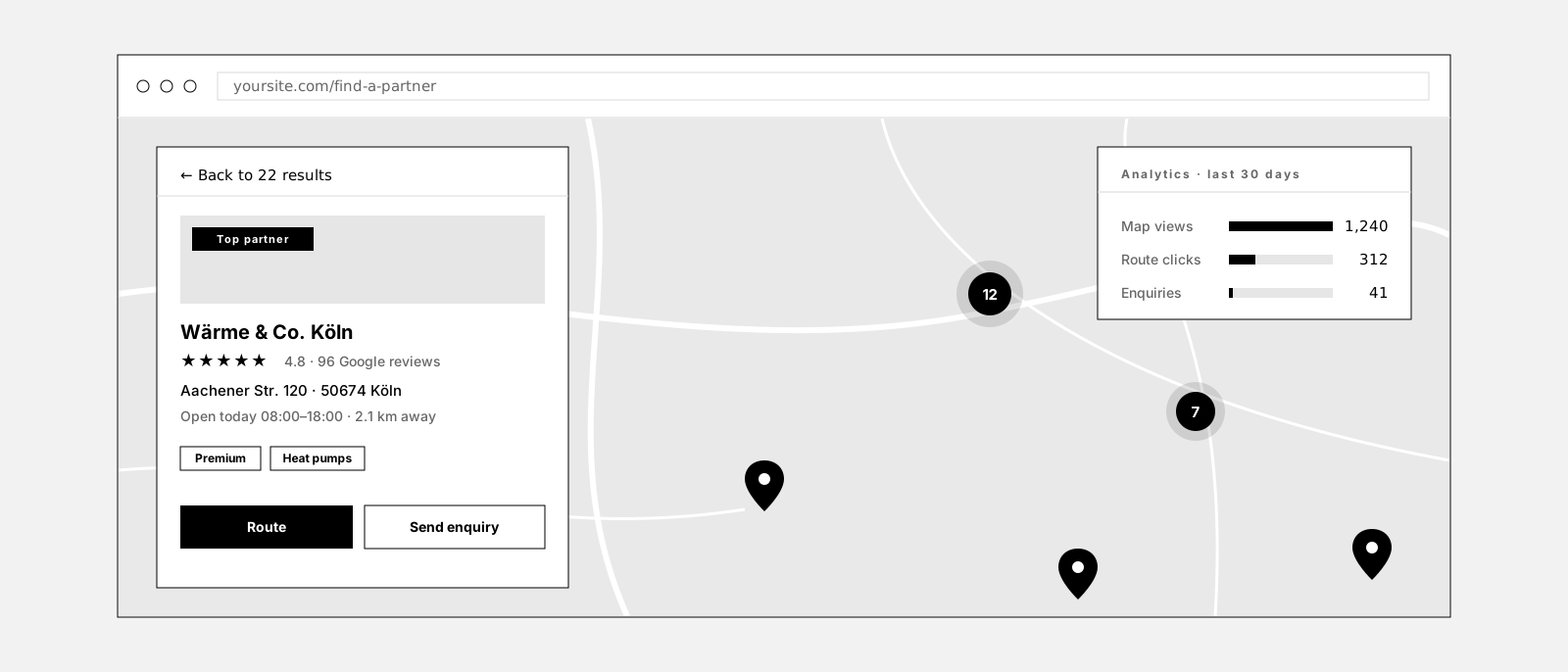
Partner Map Locator Pro: a floating Design 7 panel showing one partner in full with rating, opening hours, a route button and a Send enquiry button, a map with clustered markers, and an analytics card with map views, route clicks and enquiries
Design 7 in Pro: one panel that switches between the result list and a single partner in full. Clusters keep hundreds of markers readable, the enquiry form reaches the partner, the numbers stay on your server.

Does a store locator have to mean Google Maps?

For most locators it does, and it costs more than the map. A billing account, a key with the right referrer restrictions, a second key for anything the server does, and a visitor IP on its way to Google before anyone has clicked a thing. For a network of twelve branches that is a lot of machinery around a list of addresses.

So this plugin starts at the other end. As installed it renders a searchable, filterable list of your locations and requests nothing from anywhere. Want a map: OpenStreetMap runs on the bundled Leaflet library with no account and no key. Want Google: enter your key and you get Google, with a consent gate in front of the tiles if your legal page needs one.

List only is the default. Until you pick a provider, no map service is contacted, no tile is loaded and no visitor IP leaves your site. Search, filters, radius and the whole list still work.

This is what it looks like

Sample data, no tiles, no external request.

8 of 8 partners · sample data
yoursite.com/find-a-partner

A live demo, not a screenshot: the region and partner-level chips filter list and map together, Near me adds a radius and sorts by distance, a row highlights its marker. Every control here is a real setting in the plugin.

One data set, eleven designs

You enter your locations once. What a page makes of them is a setting, and the design attribute on a shortcode or a block can override it for that one map. Four designs come with the free plugin, seven more with Pro, plus Pocket for a sidebar, Table for people who compare, and two entries that ask a question before any map appears.
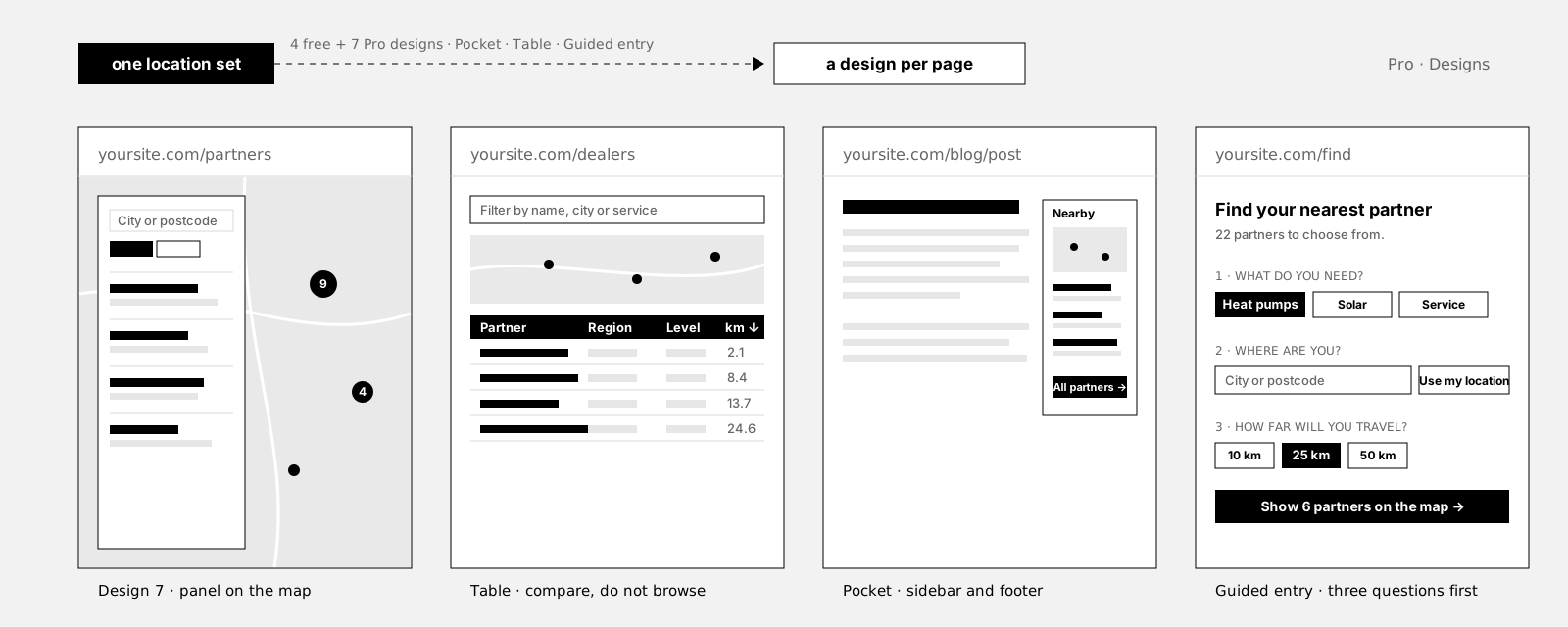
Four wireframes of the same locations: Design 7 with a floating panel over a full map, the Table design with filter bar, map band and sortable table, the Pocket widget in a sidebar, and the guided entry with three questions in front of the map
The same locations, four ways: Design 7 for the partner page, Table for people who compare, Pocket for a sidebar or footer, the guided entry for visitors who would rather be asked.
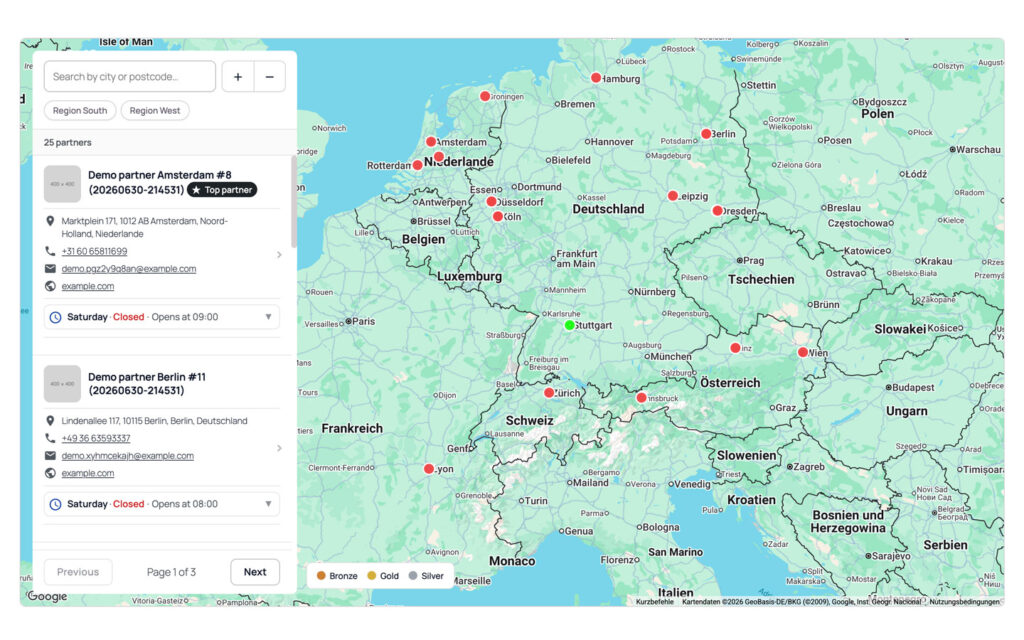
Store locator in Design 7 with a full-bleed map and a floating panel on the left holding its own search field, zoom buttons, category chips, partner cards with photo, address, phone, email, website and opening hours, and pager controls reading Page 1 of 3.
Search, filter, browse, all in the panel; the map stays whole.
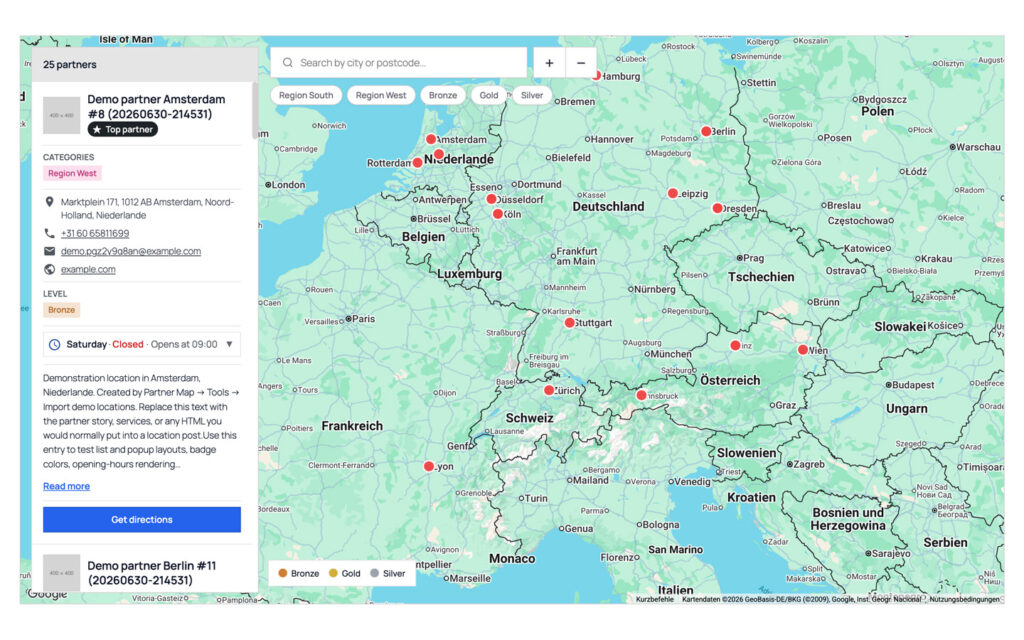
Store locator in Design 1 with a full-width map, a floating result list on the left showing a partner with photo, categories, address, phone, email, partner level, opening hours and a directions button, filter chips for regions and partner levels above the map, and a Bronze, Gold and Silver legend in the corner.
The map fills the section, the list floats over it.

Each design brings its own list card, its own filter row and its own markers. The taxonomy colors carry through all of them: the chip, the badge on the card, the pin on the map and the legend under it are the same color because they are the same term.

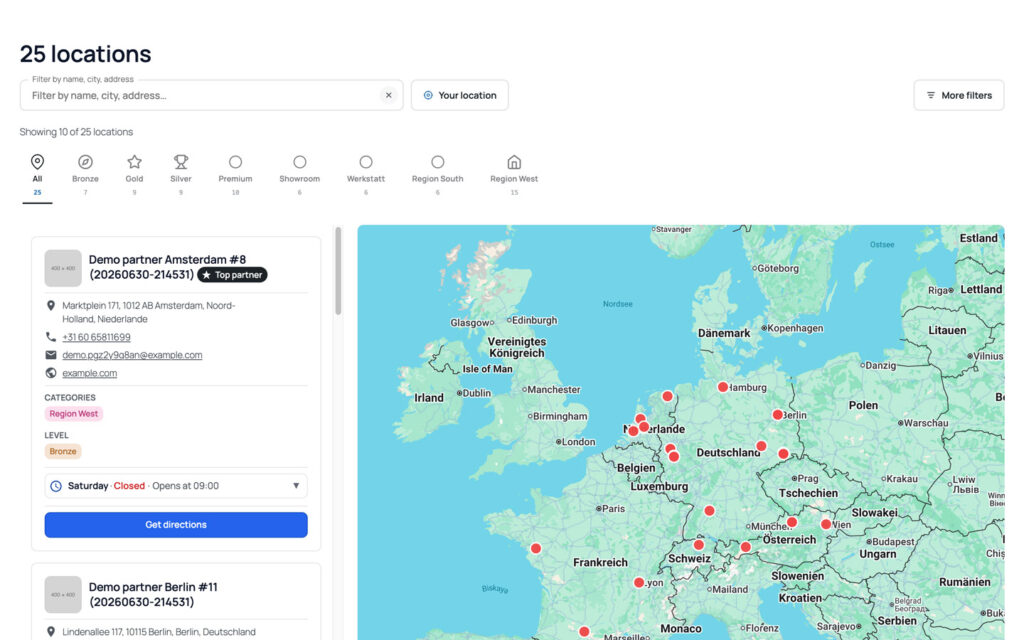
Split view with an icon-based quick-filter strip (All, Bronze, Gold, Silver, Premium, Showroom, Werkstatt, Region South and Region West, each with an outline icon and a count) above the partner list on the left and the map on the right.
One icon per term, swipeable on a phone.
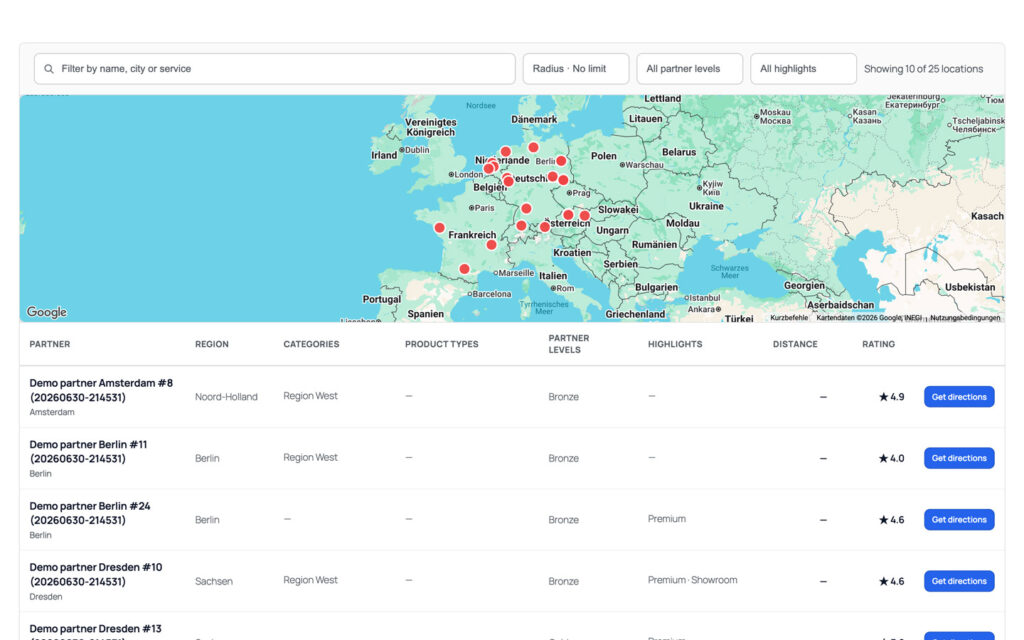
Table layout with a filter bar, a wide map band across the top and a sortable table below listing partner, region, categories, product types, partner levels, highlights, distance and rating, with a directions button on every row.
For networks people compare instead of browse.
Guided entry card at step 2 of 3 asking where are you, with a city or postcode field, a Continue button, a back link, a three-segment progress bar and a Skip and show all link.
Three questions, or skip straight to the list.
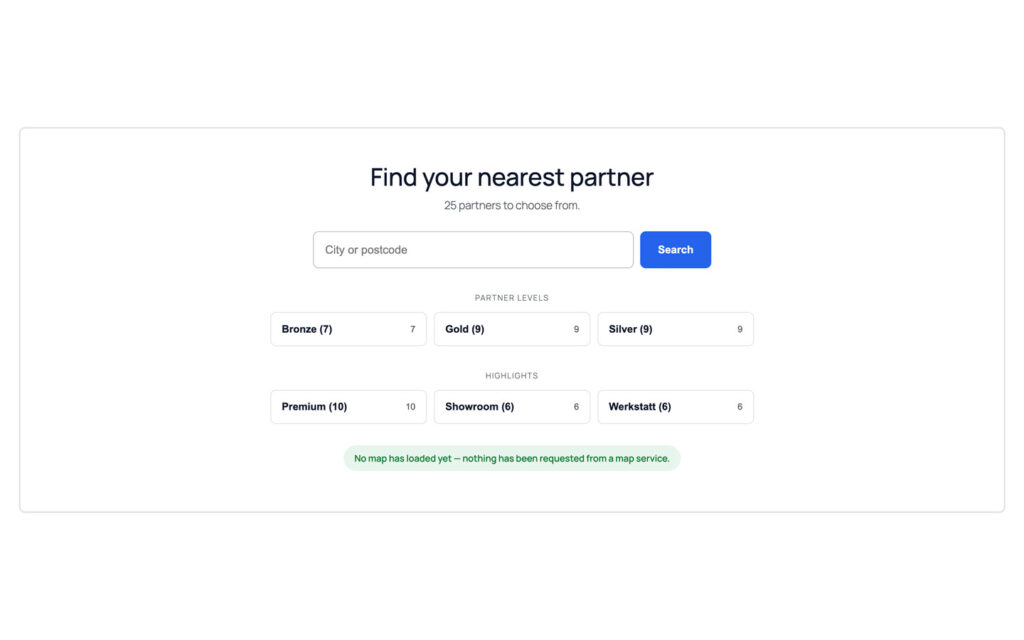
Entry screen headed Find your nearest partner with a search field, tiles for the partner levels Bronze, Gold and Silver and for the highlights Premium, Showroom and Werkstatt, each with its number of locations, and a green note stating that no map has loaded yet and nothing has been requested from a map service.
Nothing reaches a map service until the visitor asks for it.
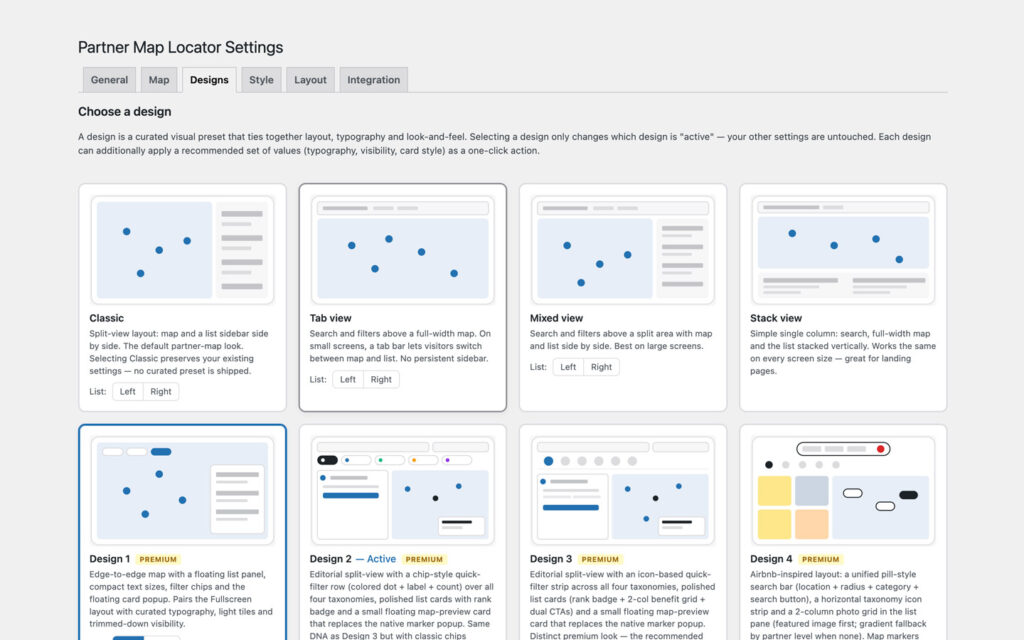
Designs tab showing a grid of design cards with wireframe previews and descriptions: Classic, Tab view, Mixed view and Stack view with left or right list toggles, and Design 1 to Design 4 marked Premium, with Design 2 labeled active.
Choosing a design leaves every other setting alone.

How it works

Locations are WordPress posts

Free
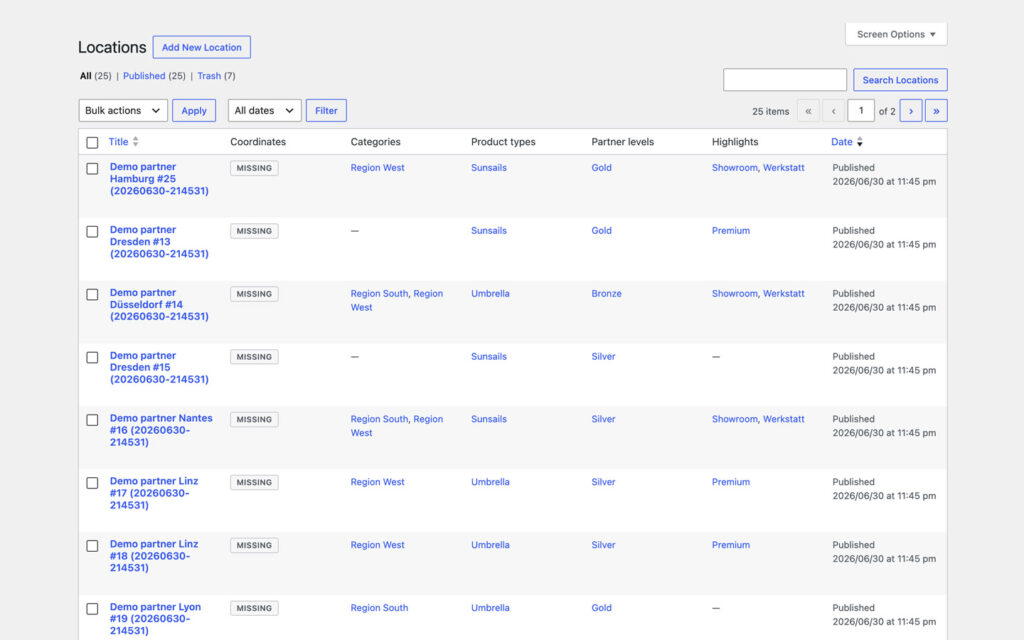
A location is a post: title, editor text, featured image, and address, coordinates, phone, email, website and opening hours as fields under it. Type one in, paste a Google Maps share link and let the server read coordinates, place id and title out of it, or import a CSV for the whole network. A second import updates the entries it recognizes instead of duplicating them, and the export gives the same file back.

WordPress list table of twenty-five locations with columns for title, coordinates, categories, product types, partner levels, highlights and date.
One screen, all four taxonomies.
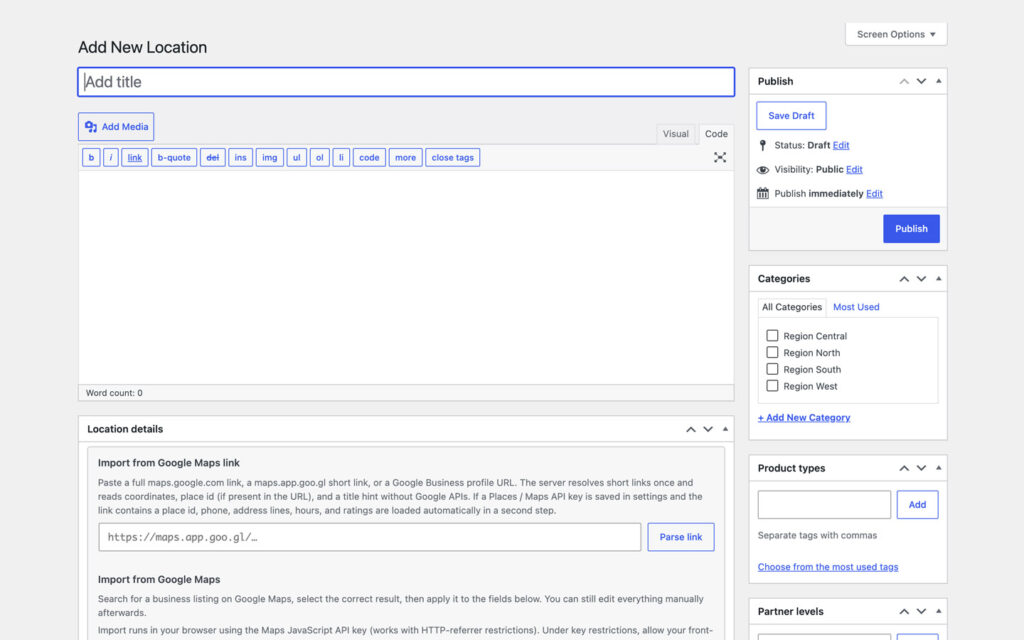
The Add New Location editor with a location details box that takes a Google Maps link and a Parse link button plus a business search, and a sidebar with publish, categories, product types and partner levels.
Paste the Maps link, keep editing by hand.

Four taxonomies, and they are the filters

Free
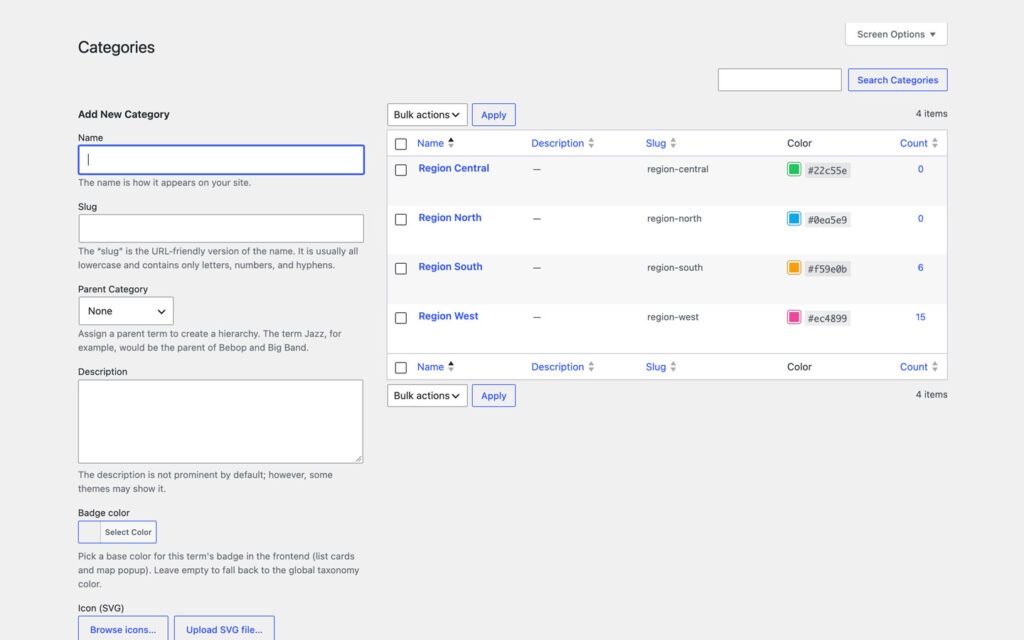
Categories, product types, partner levels and highlights: where a partner is, what they carry, what rank they hold, what makes them different. Every term gets a badge color and an SVG icon, and that is what a visitor sees as a filter chip, as a badge on the card and as the color of the pin. Categories are hierarchical, so regions can sit under a parent region.

The Categories screen with a term form holding name, slug, parent category, description, a badge color picker and an SVG icon field with browse and upload buttons, next to four region terms with their hex colors and location counts.
Every term brings its own badge color and icon.
The Partner levels screen with Bronze, Gold and Silver, their hex colors in the color column and their counts of seven, nine and nine locations.
The level colors are the marker colors.

A map, or no map at all

Free

Three providers: list only, OpenStreetMap with the bundled Leaflet library and no account, or Google Maps with your key. Free-text search over name, city and address, a filter per taxonomy, a radius around the map center and an optional Near me button that stays off until a visitor presses it. Every location ships Schema.org LocalBusiness markup, and the list is rendered on the server, so it works before any script does.

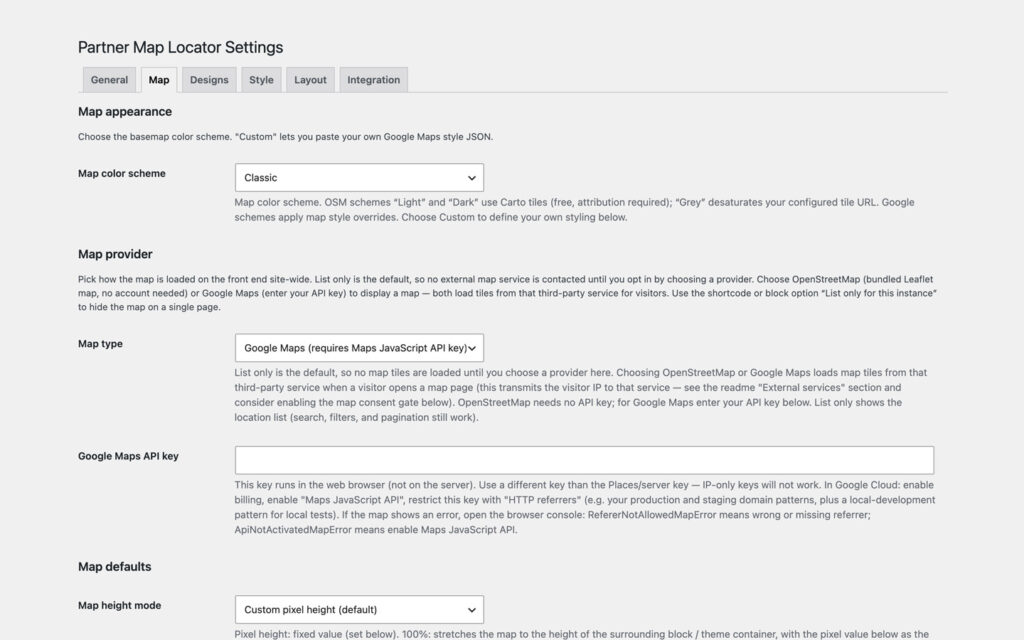
Map tab with the color scheme set to Classic, a map provider section explaining that list only is the default and that OpenStreetMap or Google Maps loads tiles from that third-party service, the map type set to Google Maps, an empty API key field and the map height mode.
Not a single tile is loaded until you pick a provider.

Clusters, enquiries and the numbers

Pro

Nearby markers collapse into counted circles until the visitor zooms in, on both providers. Popups become mini or full overlay cards instead of a bubble on the pin. Every popup can carry a Send enquiry button whose mail goes to that partner, protected by a nonce, a honeypot, a time trap, a consent checkbox and a rate limit, with Akismet on top when it is active, or replaced by a Contact Form 7 or WPForms shortcode. The dashboard counts map views, searches, filter usage and clicks on route, website, phone and email, per location and per day, on your own server.

Integration tab with the Google Places ratings sync switched off, a counter of estimated API calls today and over the last seven days, the sync interval set to weekly, optional fields for a Places API key and a Google Map ID, and the enquiry form set to off.
Both connections stay off until you switch them on.
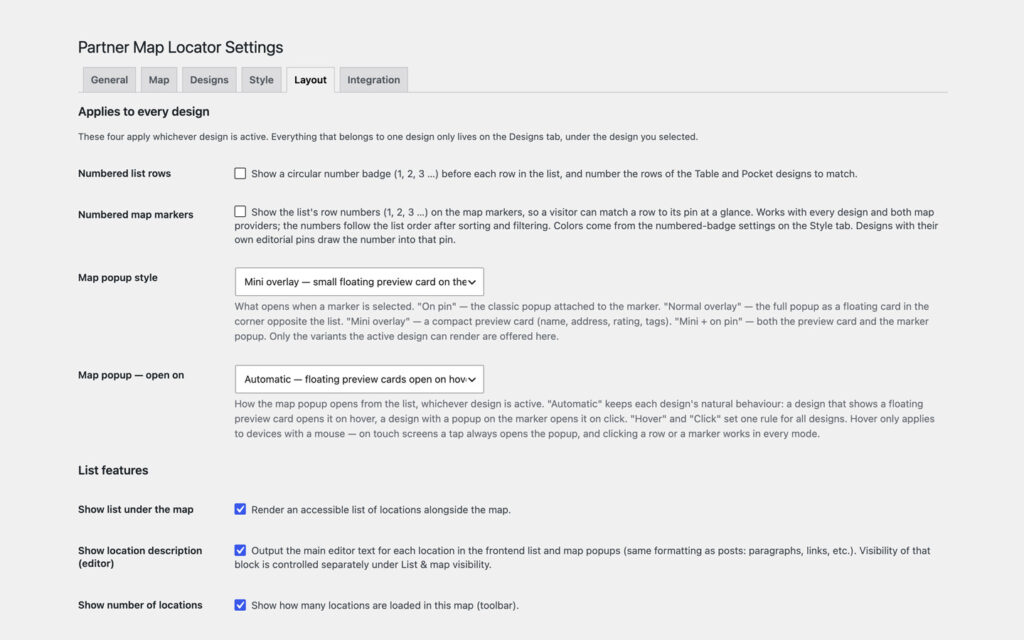
Layout tab with four cross-design options (numbered list rows, numbered map markers, map popup style set to mini overlay and popup opening set to automatic) above the list features for showing the list, the location description and the number of locations.
Four switches that apply whichever design is active.

Who uses it

Manufacturers and dealer networks

Where can I buy this, and who nearby is a certified partner? Product types and partner levels as filters, clusters for a whole country, the enquiry form as the lead channel.

Retail chains and branches

Every branch with the hours for today and a phone number that dials. One CSV from head office, re-imported without duplicates. Pro: the Table design for which branch has what.

Associations and member directories

Practices, workshops, schools or clubs searchable by postcode, without handing member addresses to Google. List only or OpenStreetMap; Pro: the guided entry for members who want to be asked.

Public sector and healthcare

Where privacy outweighs convenience: no external request until a provider is chosen, a consent gate in front of the tiles, an accessible server-rendered list, and analytics that stay on your own server.

Free vs Pro

FeatureFreeProfrom €69/year
Locations, four taxonomies, opening hoursYesYes
Map providerList, OSM, GoogleList, OSM, Google
Search, filters, radius, near meYesYes
Maps-link import, CSV import and exportYesYes
Designs411 plus Pocket and Table
Guided entry: Discover and GuideNoYes
Marker clusteringNoYes
Map popup overlaysNoYes
Enquiry form per partnerNoYes
Analytics dashboardNoYes
Updates and supportwordpress.org1 year
Pro is an add-on, not a replacement: the free plugin stays installed and keeps your locations, settings and designs. Without a license key Pro stays dormant and the free locator carries on.

Plans

1 site

€69/year

for 1 site

All Pro features, one year of updates and support.

Get Pro →

5 sites

€149/year

for 5 sites

All Pro features, one year of updates and support.

Get Pro →

Unlimited

€249/year

unlimited sites

All Pro features, one year of updates and support.

Get Pro →

14-day money-back. Renews yearly at the same price, cancel anytime. Keeps working after expiry, updates and support stop. Pro is GPL, like the free plugin: what you buy is a year of updates and support for the sites in your plan, and the license key that delivers them.

What it does not do

This is the part most plugin pages leave out.

It is not a routing engine. The directions button hands the address to the maps app the visitor already uses. No turn-by-turn inside your page, no travel-time matrix, no route optimization.

The analytics are not Google Analytics. Counters on your own server: map views, searches, filters and clicks on route, website, phone and email, per location and per day. No visitor profiles, no funnels, no forwarding anywhere. IP addresses are never written to the database; a 60-second hash rate-limits the endpoint and is then discarded.

Coordinates have to come from somewhere. From a pasted Google Maps link, from a CSV, or typed in. Automatic geocoding of a plain address needs a Google key; without one, a location without coordinates stays in the list and off the map.

A map is still a third party. OpenStreetMap needs no account, but its tiles do come from openstreetmap.org, and Google tiles come from Google. That is what the consent gate and the list-only default are there for.

Google ratings need Google. The optional weekly rating sync uses the Places API with a server key of your own. Without it the star ratings you enter by hand are shown, and nothing is fetched.

It ships in English. Every string is translatable and the plugin works with WPML and Polylang, but the interface arrives in English.

Why not a Google Maps embed?

An embed shows a pin. A locator answers a question: who is near me, who carries this, who is open right now, how do I reach them. That needs your data in your database: filters, a radius, opening hours, contact details, a rating. Not an iframe pointing at someone else.

The embed also loads Google on every single page view, whether the visitor scrolls that far or not, and it takes a consent entry with it. Here the list is yours, rendered on your server, and the map is a choice you make once and can take back.

Set up in three steps

01

Start free

Plugins, Add New, search for Partner Map Locator, install, activate. Add your locations under Locations, or import a CSV from Locations, Tools. Place the map with the block or with [partner_map_locator]. No account, no key, no license.

02

Move to Pro when the network grows

Upload the Pro ZIP from your account and activate it next to the free plugin. It is an add-on, so the free one stays. The license key arrives by email and goes into Locations, Pro Licence; from then on updates arrive inside WordPress.

03

Pick what the network needs

Clustering on the Map tab, a design on the Designs tab or per shortcode, the guided entry in front of it, the enquiry form on the Integration tab, analytics under General, Advanced. Then read Locations, Analytics.

Free stays free, Pro pays for it

The free plugin keeps every feature it has today and gets the fixes Pro finds. It never contacts our servers, and it is the whole locator: locations, taxonomies, search, filters, radius, four designs, CSV, Schema.org. Pro is what pays for the next release of both, and it is GPL as well: what you buy is a year of updates and support for the sites in your plan, and a license key that delivers them.

If the free plugin saved you an afternoon, a rating on wordpress.org or a post in the support forum is the useful thing. If Pro did, the ticket form is one click away in your account.

Screenshots

Four more designs on the same twenty-five demo locations, and the settings screens the text above never needed.

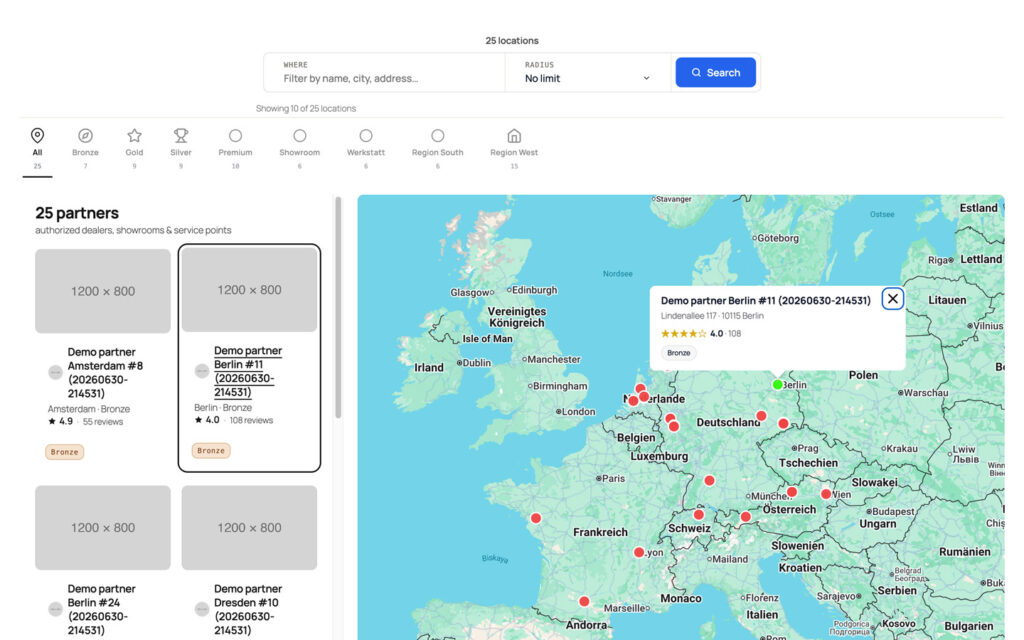
Split view with a row of colored filter chips reading All 25, Bronze 7, Gold 9, Silver 9, Premium 10, Showroom 6, Werkstatt 6, Region South 6 and Region West 15, above a list of partner cards on the left and a map on the right.
Every filter and its count, in one row.
Airbnb-style locator with a pill search bar for place and radius, an icon filter strip, a two-column photo grid of partner cards showing name, city, partner level, rating and review count, and a map on the right with an open preview card for a Berlin partner.
Photo first, for networks whose partners have pictures.
Full-bleed map with ring-style markers, a large orange pin for the selected partner in Stuttgart, a floating preview card showing name, address, a five-star rating with 161 reviews and a Bronze tag, and the result list floating on the left.
The pin you picked steps forward.
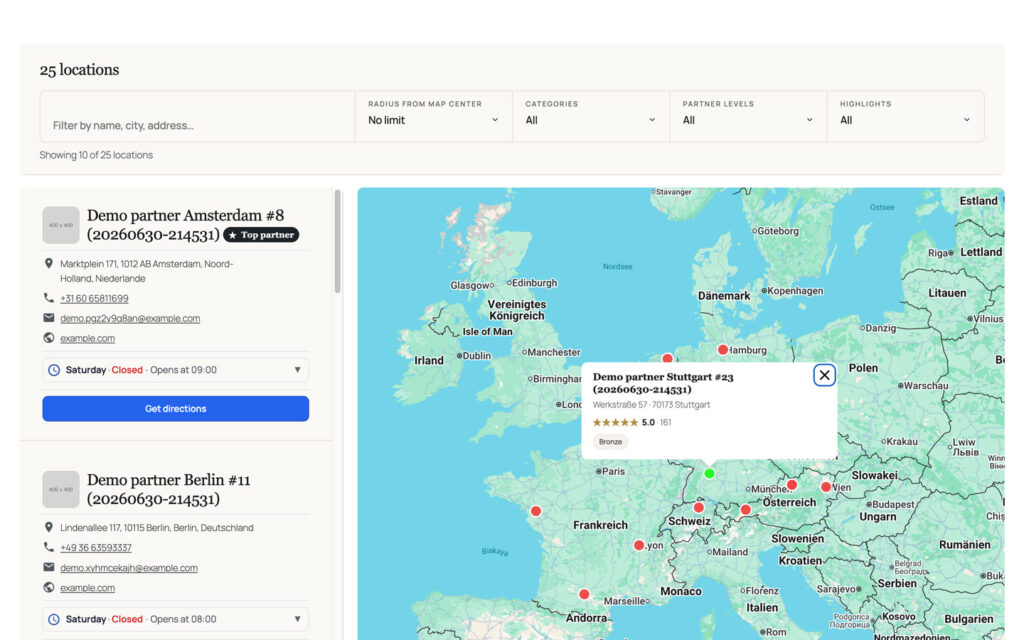
Split view with a filter bar holding a text filter, a radius-from-map-center selector and dropdowns for categories, partner levels and highlights, a counter reading Showing 10 of 25 locations, a partner list on the left and a map with an open popup on the right.
Move the map, the radius moves with it.
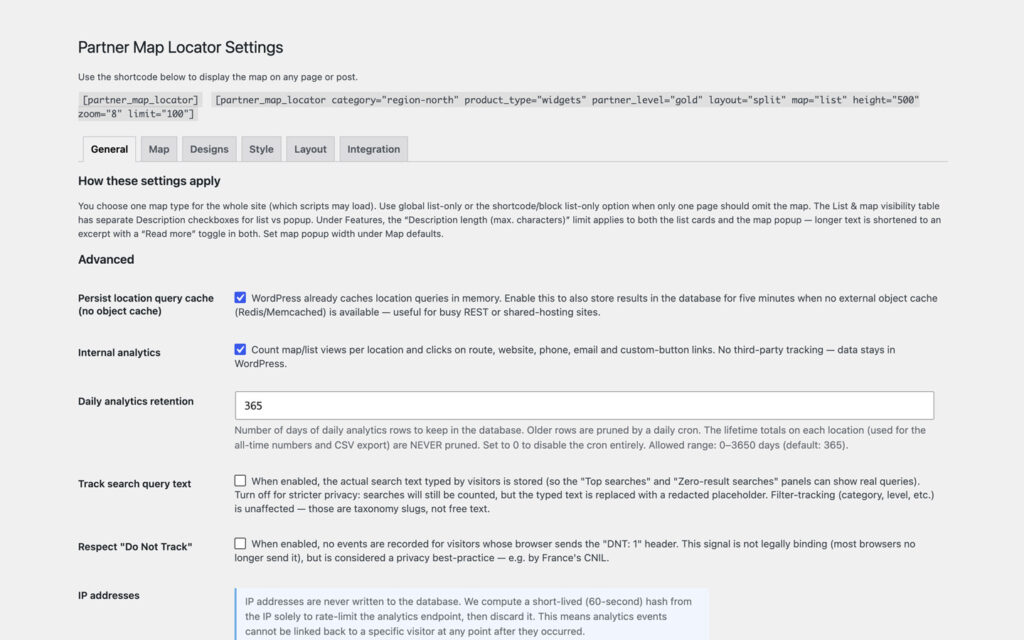
Partner Map Locator settings on the General tab, with the shortcode and a fully attributed example at the top and advanced options for query caching, internal analytics, an analytics retention of 365 days, search-text tracking, Do Not Track and a note that IP addresses are never written to the database.
Analytics that stay inside WordPress, and no stored IPs.
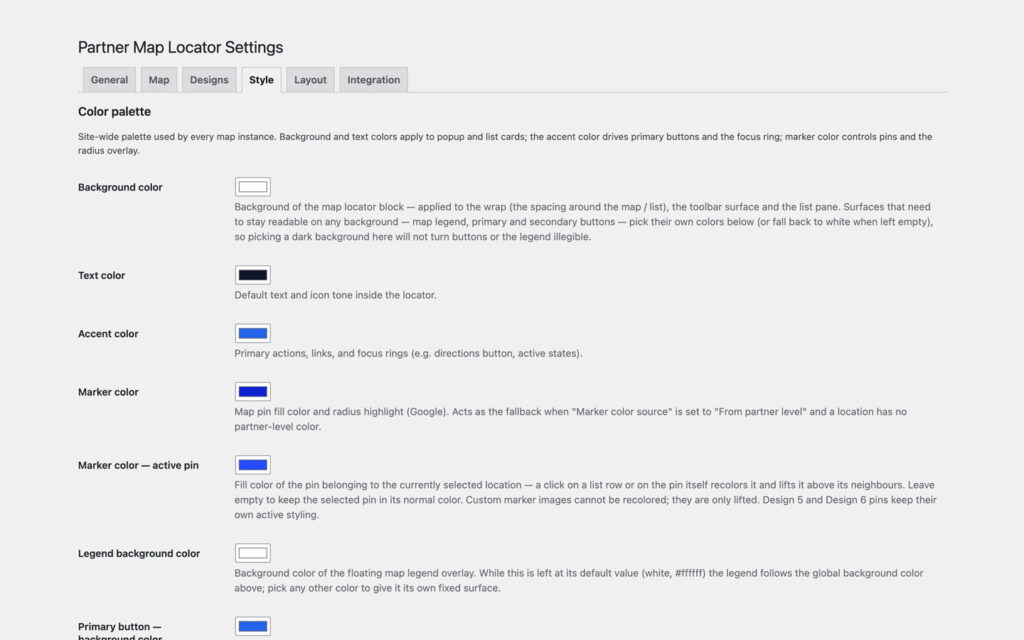
Style tab with color pickers for background, text, accent, marker, active pin, legend background and primary button, each with a line explaining where that color is used.
Set the colors once, every instance follows.
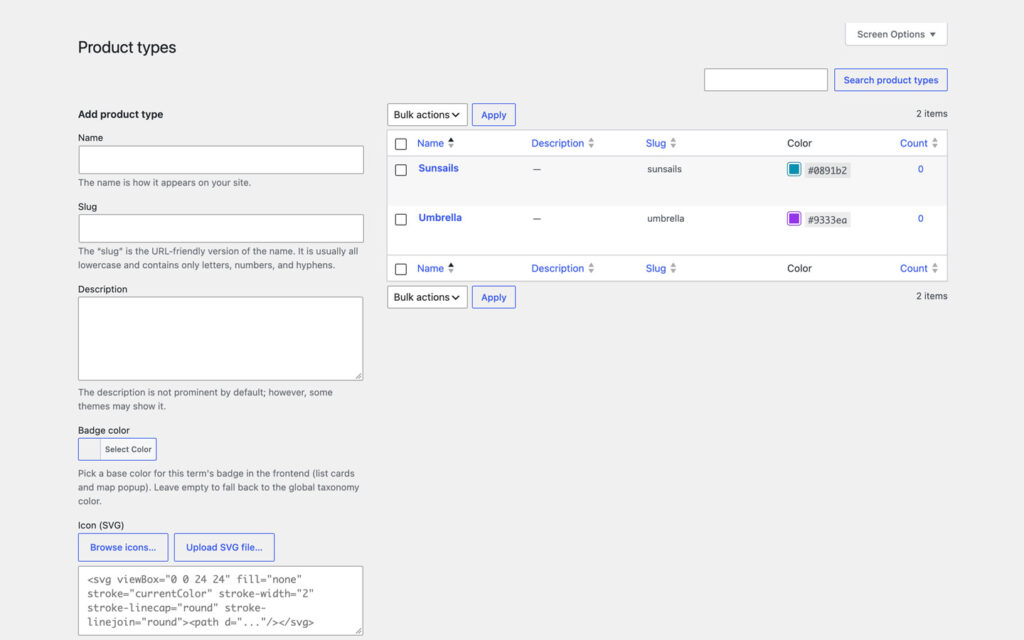
The Product types screen with the terms Sunsails and Umbrella, each with a hex color, beside the term form with badge color and SVG icon fields.
What a partner carries, kept apart from where they are.
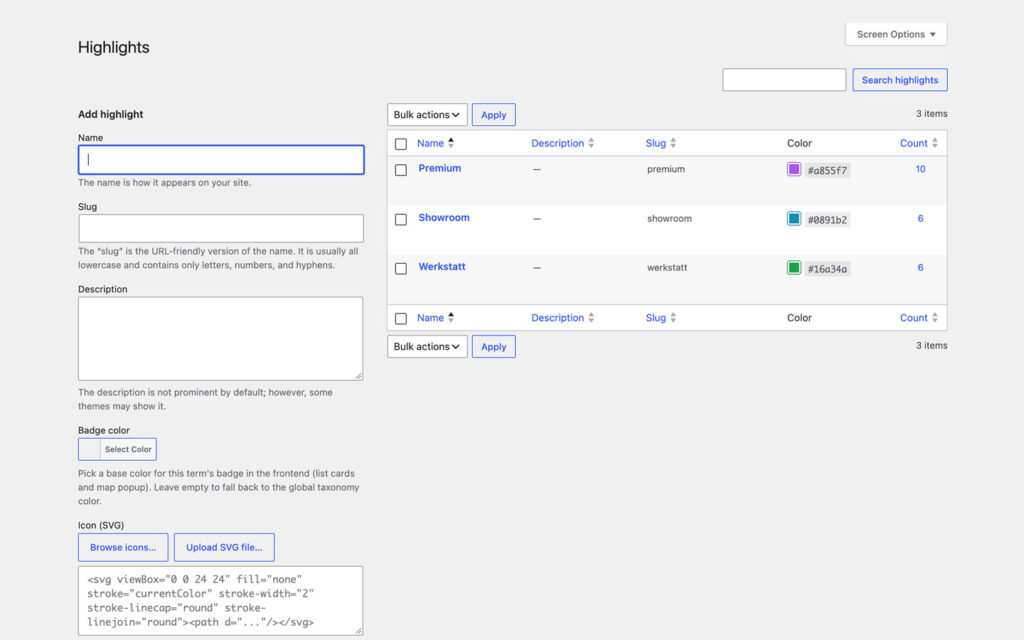
The Highlights screen with the terms Premium, Showroom and Werkstatt, their hex colors and counts, beside the term form with badge color and SVG icon fields.
Everything that is not a region, a product or a rank.

Frequently asked questions

Do I need a Google account?

Only for the Google Maps provider and the optional Google extras: geocoding, the ratings sync and the Maps-link import. Choose OpenStreetMap and the map renders with the bundled Leaflet library against openstreetmap.org tiles, with no account and no API key. Choose list only and nothing external is loaded at all.

Is Pro a separate plugin?

Yes. Pro is an add-on that needs the free plugin installed and active. It hooks into it, unlocks its settings and adds its designs. Without a license it stays dormant and the free plugin keeps working normally.

Which Google API keys do I need?

One key restricted by HTTP referrer for the browser covers Google Maps, the Maps-link import, the business search and autocomplete. A second, IP-restricted key is only needed for the server-side work: the weekly sync of Google ratings and the short-link resolver. Both fields are optional.

Can one page show only the list while another shows the map?

Yes. Set the map type to list only for the whole site under Settings, Map, or keep your provider and add map="list" to a single shortcode, or tick List only for one block in the block sidebar.

Can I show a different design per page?

Yes. The design attribute picks Classic, Tab view, Mixed view, Stack view or, with Pro, Designs 1 to 7, Pocket, Table, Discover and Guide for one map, independent of the global design. The color palette stays site-wide so the designs do not drift apart.

Where do enquiries go, and is the form GDPR-friendly?

To the email address on that location and, as Bcc, to an admin address you set. The form carries a consent checkbox with your own text, a nonce, a honeypot, a time trap and a per-visitor rate limit, and Akismet checks every enquiry on top when that plugin is active. There is no CAPTCHA widget, so nothing loads from a third party in the visitor browser.

Does the analytics dashboard track visitors?

No. It counts events on your own server: map views, searches, filter usage and clicks on route, website, phone, email or a custom button, per location and per day, kept for the retention period you set. No cookies, no third-party script, IP addresses are never stored, and the whole thing can be switched off.

Where is the data stored, and how do I move it?

Each location is a regular WordPress post in the pmloc_location post type, with its fields as post meta under the pmloc_ prefix. Locations, Tools exports and imports CSV, and a re-import updates existing entries instead of duplicating them.

What is the difference to the CodeCanyon edition?

The same plugin. On desk9design.com you get a license key and updates inside WordPress through the Pro Licence page; on CodeCanyon updates come through Envato and there is no licence page.

What happens when my subscription expires?

The plugin keeps working exactly as configured. Updates, new features and support stop until you renew. No penalty, no data loss.

How many sites can I use it on?

As many as the plan you pick. A staging site never counts. You can move a license between sites from your account.

Can I upgrade to a bigger plan later?

Yes, from your account. You pay the difference for the rest of the year.

What if it is not for me?

14-day money-back guarantee, no questions asked. Renewals included.

Changelog

v1.3.5 · Sep 14, 2026Maintenance release, no functional change.

Pro releases above. Free changelog on WordPress.org

More from desk9

Desk9 Reviews for Google Your Google rating on your own site, with a Pro for several locations.

Sticky CTA Button The call-to-action that stays in reach and knows which page it is on.

All desk9 plugins Ten of them, maintained monthly, seven free.

A store locator that contacts nobody until you say so.

The free version stays free. Pro funds the next release.

Pro is an add-on

Keep the free plugin, activate Pro next to it, paste the license key under Locations, Pro Licence. Your locations, settings and designs stay as they are.

license key by email / updates inside WordPress

At a glance

Pro
Version1.3.5
Last updateSep 14, 2026
Requires WP6.2+
PHP7.4+
LicenseGPLv2 or later

Free version: 1.4.12 on wordpress.org, updated Sep 14, 2026, WordPress 6.2+, PHP 7.4+, tested up to 7.1.3. wordpress.org →