Home / Plugins / Desk9 Reviews for Google

FreeProv1.0.0 · updated Sep 7, 2026 · GPL

Desk9 Reviews for Google: Real Google reviews on your site, kept current

A WordPress plugin that keeps your latest Google reviews on your own pages through the official Places API: one key, no OAuth, sixteen layouts, block and shortcode, hourly sync on the server. The free plugin covers one business. Pro adds every location you have, a combined rating and an overview card per branch.
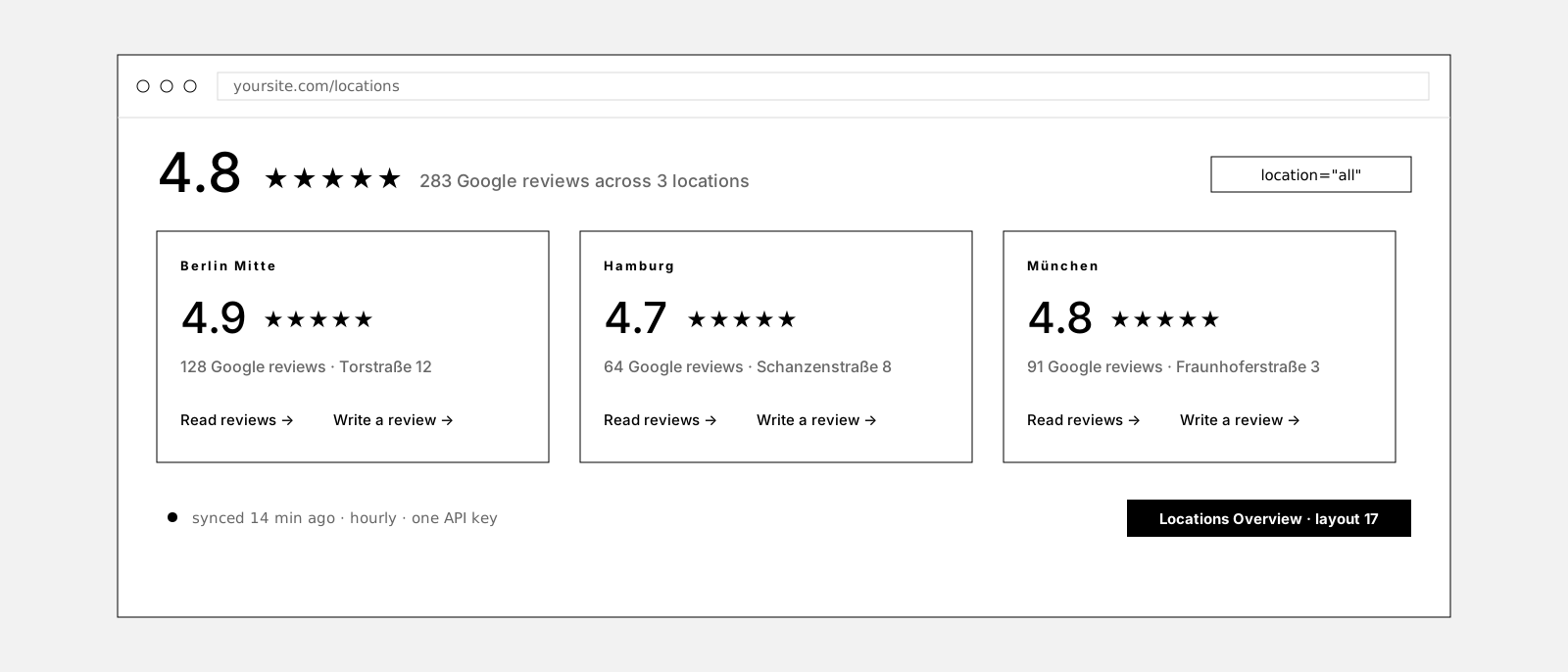
The Locations Overview layout with a combined rating of 4.8 stars from 283 Google reviews across three locations, above one summary card per location

Do Google reviews belong on your own site?

Yes, if they are the real ones. A visitor who reads three recent reviews next to your booking button does not have to leave for Google to check whether you are any good. The trouble starts with how sites usually get them there.

Pasted reviews go stale the day they are pasted, and the newest ones, the ones that prove you are still good, never make it. Screenshots are worse. Embed widgets load a script from a third party on every page view, some want OAuth and a verified Business Profile, and the visitor pays for it in load time.

What a site needs is the same thing Google shows, fetched by the server, cached, rendered in your design, and refreshed without anyone touching it. One API key, one business, done. And no way to polish the result, because polished reviews are the ones nobody believes.

It shows what Google returns, exactly as written. No editing, no hiding, no filtering by stars, in Free and in Pro.

This is what it looks like

6 of 16 layouts, sample reviews. Location chips need Pro.

6 of 16 layouts · sample reviews
Location · Pro same block, location attribute switched
yoursite.com/reviews
4.9 ★★★★★128 Google reviews · Berlin Mitte · newest first Write a review
Mara S.2 days ago
★★★★★

Booked on Tuesday, seen on Wednesday. Friendly team, clear explanation, no waiting. The kind of practice you recommend to friends.

Jonas R.1 week ago
★★★★★

Second time here and again exactly what was promised. Fair price, done on time, invoice as agreed.

Ayşe D.3 weeks ago
★★★★☆

Very good work and a quick reply on the phone. One star less only because parking is tight.

Lena P.4 days ago
★★★★★

Called in the morning, appointment the same afternoon. Everything explained calmly, nothing pushed.

Tom W.2 weeks ago
★★★★☆

Solid work, friendly people. The waiting room is small, but you do not wait long.

Samira K.1 month ago
★★★★★

The best branch of the three in my experience. Thorough and honest about what is needed.

Mara S.2 days ago
★★★★★

Booked on Tuesday, seen on Wednesday. Friendly team, clear explanation, no waiting. The kind of practice you recommend to friends.

Berlin Mitte
Lena P.4 days ago
★★★★★

Called in the morning, appointment the same afternoon. Everything explained calmly, nothing pushed.

Hamburg
Felix N.6 days ago
★★★★★

Quick, precise, and the invoice matched the quote to the cent. Happy to come back.

München

Sample reviews in six of the sixteen layouts, light or dark. The location chips switch the same block between branches the way a Pro attribute would; the free plugin shows one listing. On your site: the real reviews Google returns, exactly as written, newest first.

How it works

One key, one business, connected in minutes

Free
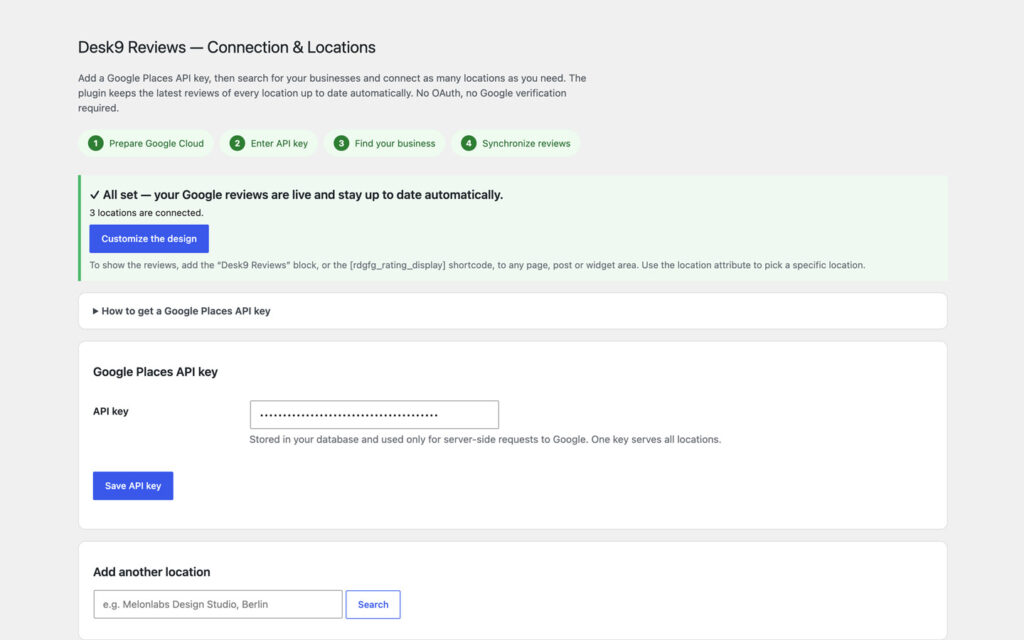
Create a key in a Google Cloud project with the Places API (New) turned on and restrict it to your server. Paste it, search your business by name, connect it. From then on the plugin refreshes the rating and the latest reviews every hour on the server and reconciles once a day. No OAuth, no client secret, no Business Profile approval to wait for, and nothing has to be your own listing: any public Google business works.

Connection and locations screen with four numbered setup steps, a green all-set box saying three locations are connected, a masked Google Places API key field with the note that one key serves all locations, and a search field to add another location.
One key for every branch: paste it once, search each location by name, connect it.

Sixteen layouts from one design

Free

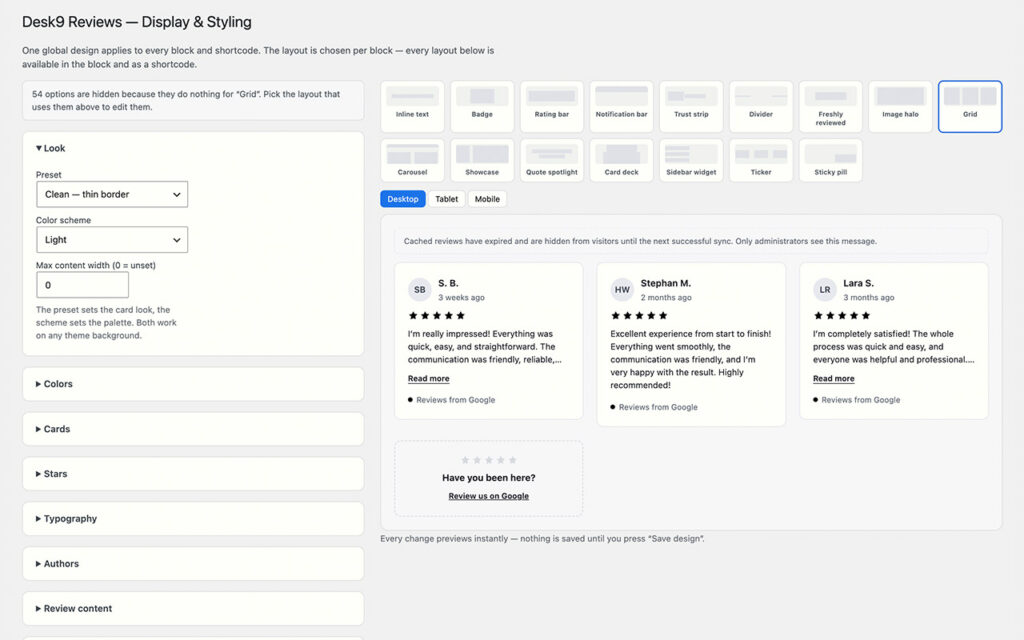
Eight rating layouts, from a one-line inline rating that sits inside a sentence to a badge, a bar, a trust strip or a halo over your own image. Eight review layouts, from a grid to a carousel, a quote spotlight, a card deck and a sticky pill. One global design for all of them: five presets plus Custom, light, dark or the visitor system setting. The block and the [rdgfg_rating_display] shortcode share the engine, and the live preview shows only the options that do something for the layout you picked.

Display and styling screen with a look panel for preset and color scheme on the left, a gallery of sixteen layout thumbnails with Grid selected, a desktop, tablet and mobile switch, and a live preview showing three review cards and a card inviting visitors to review on Google.
Pick the layout per block, set the design once; the preview renders every change before you save.

Every location, one installation

Pro
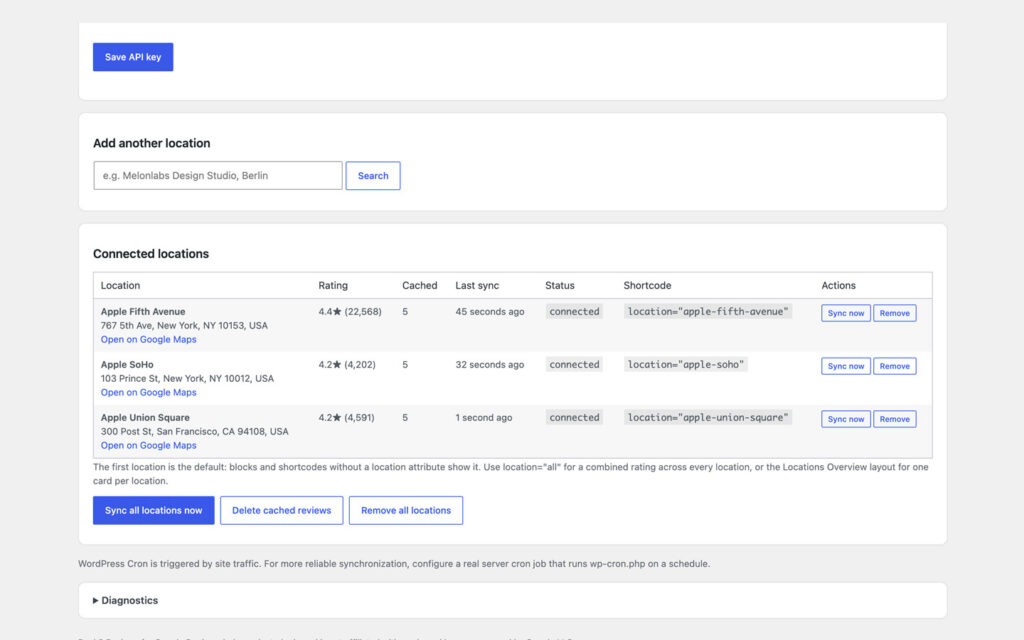
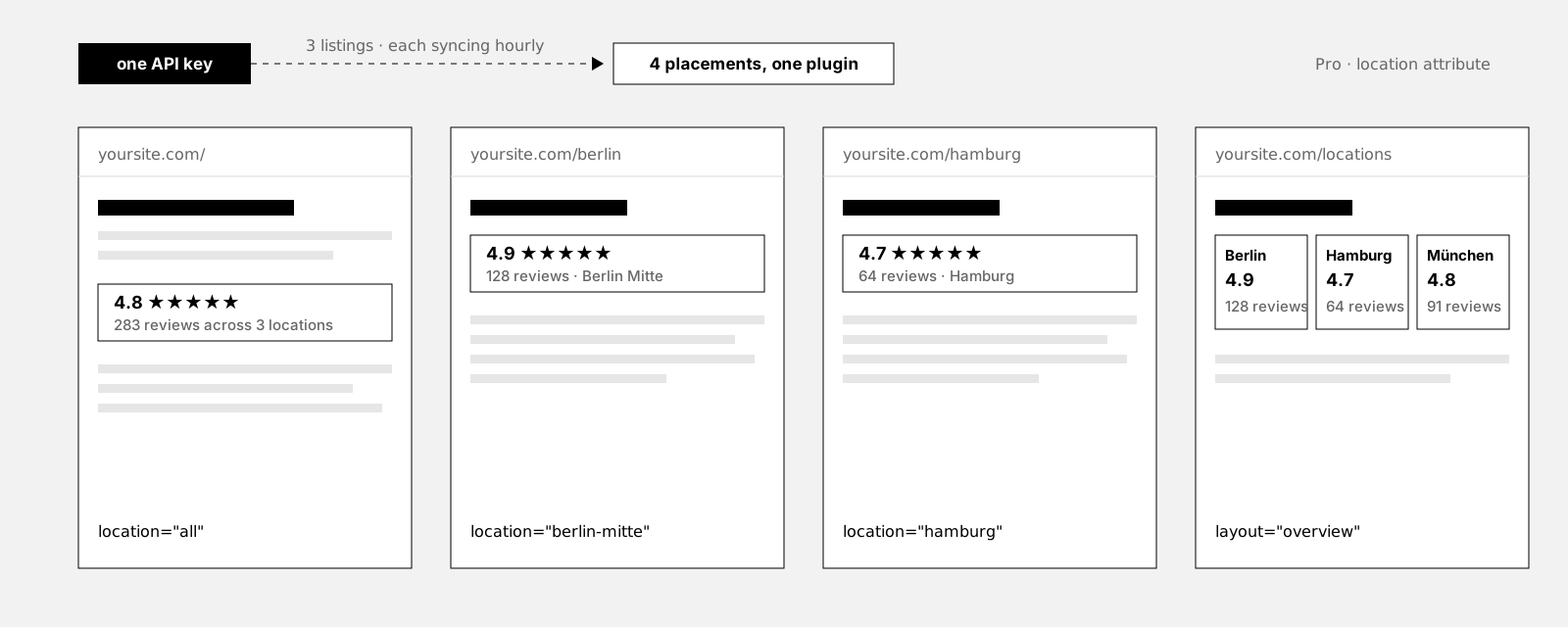
Connect as many Google listings as you have with the same key; each one syncs on its own with its own cache and status. A location attribute on the block and the shortcode picks the branch per placement, location set to all shows the combined rating, a weighted average with the summed review count, and the Locations Overview layout renders one summary card per branch. A Locations table in the admin shows status, last sync and the shortcode snippet for each. Connection, design and cached reviews carry over from the free plugin.

One API key feeds three Google listings; four pages of one site show the combined rating on the home page, the Berlin rating on the Berlin page, the Hamburg rating on the Hamburg page and the Locations Overview on the locations page
One key, three listings, four pages. The location attribute decides which rating a block shows.
Table of three connected locations, Apple Fifth Avenue, Apple SoHo and Apple Union Square, each with rating and review count, five cached reviews, last sync a few seconds ago, a connected status, a location shortcode snippet and Sync now and Remove buttons, with Sync all, Delete cached reviews and Remove all buttons below.
Every location with its rating, its last sync and the snippet that puts it on a page.

Honest by design, quiet by default

Free
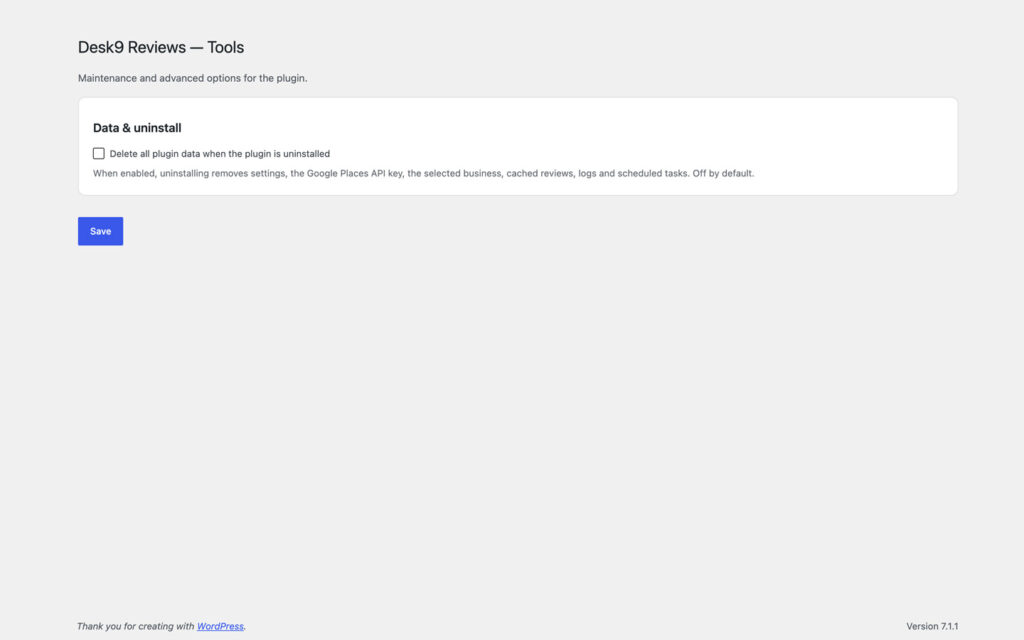
Reviews appear exactly as Google returns them, newest first, in every layout that shows several. The one exception is the Quote Spotlight, which puts a single review on stage by a rule you choose: best, newest, longest or a fixed position. The public front end never calls Google; it reads a small local cache. No cookies, no telemetry, no external fonts, reviewer photos off unless you turn them on, a friendly card instead of a 0.0 when a listing has no reviews yet, and one checkbox that decides what uninstalling removes.

Tools screen with a Data and uninstall box holding one checkbox to delete all plugin data when the plugin is uninstalled, unchecked, and a note listing settings, API key, business, cached reviews, logs and scheduled tasks.
One checkbox decides whether uninstalling takes the key, the business and the cache with it.

Free vs Pro

FeatureFreeProfrom €39/year
Google business listings1Unlimited
Layouts1616
Block and shortcodeYesYes
Presets and color schemesYesYes
SyncHourlyHourly, per location
Location per block or shortcodeNoYes
Combined rating across locationsNoYes
Locations Overview layoutNoYes
Locations admin tableNoYes
Updates and supportwordpress.org1 year
Everything in Free is in Pro. Pro replaces Free: deactivate one, activate the other, and connection, design and cached reviews carry over.

Plans

1 site

€39/year

for 1 site

All Pro features, one year of updates and support.

Get Pro →

5 sites

€79/year

for 5 sites

All Pro features, one year of updates and support.

Get Pro →

Unlimited

€129/year

unlimited sites

All Pro features, one year of updates and support.

Get Pro →

14-day money-back. Renews yearly at the same price, cancel anytime. Keeps working after expiry, updates and support stop. Pro is GPL, like the free plugin: what you buy is a year of updates and support for the sites in your plan, and the license key that delivers them.

What it does not do

This is the part most plugin pages leave out.

It shows at most five reviews per business. That is what the Places API hands out: up to five of the most relevant recent reviews, and Google decides which. Showing all of them would need the OAuth-based Business Profile API, which this plugin deliberately does not use.

It needs a Google Cloud project with billing enabled. Google requires it for the Places API even when the monthly usage stays inside the free allowance. An hourly sync is a handful of requests a day per location, but the pricing is Google's and can change.

It does not edit, hide or filter. A three-star review Google returns is shown like a five-star one, newest first. If that is not what you want, this is not your plugin.

It loads nothing from Google for visitors. The front end reads a local cache. The one exception is reviewer photos, off by default; switched on, they load from a Google domain when a page is viewed.

It phones home for one thing. Free: nothing besides the server-side calls to Google. Pro: a check for updates and the license against desk9design.com with the product slug, the key and the site address, nothing else.

It ships in English. Every string is translatable and the block renders correctly on every WPML or Polylang language, but no language pack is bundled yet.

Why not paste the reviews in yourself?

Because a pasted review has a date, and the date gets older every day. Visitors notice when the newest praise is from two summers ago, and the reviews that would convince them, last week’s, are the ones nobody got around to copying.

Embed widgets solve the freshness and create two new problems: a third-party script on every page view, and often an OAuth flow with a verified Business Profile before anything shows at all.

A server-side sync keeps the reviews as fresh as Google has them, stores them in your own database, renders them in your own design and sends the visitor nothing from Google. The only thing you give up is the ability to touch them, which is the point.

Set up in three steps

01

Start free

Plugins, Add New, search for Desk9 Reviews for Google, install, activate. No account, no license key.

02

Connect and place

Desk9 Reviews, Connection and Sync: paste the API key, search your business, sync. Then add the Desk9 Reviews block or the shortcode to a page and pick a layout; the design is set once under Display and Styling.

03

Move to Pro for more locations

Upload the Pro ZIP, activate it, deactivate Free; connection, design and cached reviews carry over. Enter the license key under Tools, License and updates, connect the other branches, and pick the location per block.

Free stays free, Pro pays for it

The free plugin keeps every feature it has today: one business, all sixteen layouts, the whole design system. Pro is what pays for the next release of both. Pro is GPL as well: what you buy is a year of updates and support for the sites in your plan, and a license key that delivers them.

If the free plugin saved you an afternoon, a rating on wordpress.org or a post in the support forum is the useful thing. If Pro did, the ticket form is one click away in your account.

Frequently asked questions

Do I need a Google API key?

Yes, a Places API key from a Google Cloud project with billing enabled and the Places API (New) turned on. There is no OAuth, no client secret and no Business Profile approval to wait for. Restrict the key to your server address.

How many reviews are shown?

Up to five per business, the most relevant recent ones as Google returns them. Showing all reviews would need the OAuth-based Business Profile API, which this plugin deliberately does not use.

Does it work for any business, or only mine?

Any public Google business listing. You do not have to own or manage it and there is nothing to verify. Search it by name, connect it.

Can I hide bad reviews or edit reviews?

No. The plugin shows the reviews Google returns exactly as written, newest first, in every layout that shows several. The one exception is the Quote Spotlight, which by design puts a single review on stage; you choose the rule, not the review.

Does it slow down my site?

No. The front end reads a small local cache. All Google calls happen on the server during setup and scheduled synchronization, and no Google script is loaded for visitors.

Are reviewer photos shown?

Only if you turn them on. Then they load from a Google domain when a page is viewed, which is the one case where a visitor contacts Google.

Can I pin a rating to the screen or drop it into a sentence?

Yes. Rating bar and notification bar span the top or bottom edge, badge, freshly-reviewed chip and sticky pill sit in a corner, all optionally dismissible. The inline layout renders as plain text, so the shortcode can sit in the middle of a paragraph or a heading.

What happens if my business has no reviews yet?

Instead of an empty box or a 0.0 badge the plugin shows a short card with a link to write the first review. As soon as Google returns reviews, the layout you picked takes over.

Does Pro need a second API key?

No. One key serves every location. Each location is one Place Details call per sync, so ten locations synced hourly are 240 calls a day.

How do I upgrade from the free plugin?

Deactivate Free, activate Pro. Connection, design settings and cached reviews carry over, and existing blocks keep showing your default listing until you pick another location.

Does it work with WPML or Polylang?

Yes. The block and the shortcode render dynamically on every language version, numbers and dates follow each locale, and the review text stays in the language the customer wrote it.

Is Pro GPL, and what exactly do I buy?

Pro is GPLv2 or later, like the free plugin. The purchase covers a year of updates and support for the sites in your plan, delivered through a license key. The plugin keeps working after the year ends; updates and support stop until you renew.

What happens when my subscription expires?

The plugin keeps working exactly as configured. Updates, new features and support stop until you renew. No penalty, no data loss.

How many sites can I use it on?

As many as the plan you pick. A staging site never counts. You can move a license between sites from your account.

Can I upgrade to a bigger plan later?

Yes, from your account. You pay the difference for the rest of the year.

What if it is not for me?

14-day money-back guarantee, no questions asked. Renewals included.

Desk9 Reviews for Google is an independent plugin and is not affiliated with, endorsed by or sponsored by Google LLC. Google and Google Business Profile are trademarks of Google LLC.

Changelog

v1.0.0 · Sep 7, 2026Initial Release

Pro releases above. Free changelog on WordPress.org

More from desk9

Sticky CTA Button The button that stays put and knows its page. Put the rating next to it.

Notice Planner A closure notice that appears on time and leaves on its own.

All desk9 plugins Ten of them, maintained monthly, seven free.

Real reviews, always current, on your own pages.

The free version stays free. Pro funds the next release.

At a glance

Pro
Version1.0.0
Last updateSep 7, 2026
Requires WP6.2+
PHP7.4+
LicenseGPLv2 or later

Free version: 1.0.0 on wordpress.org, updated Aug 26, 2026, WordPress 6.5+, PHP 7.4+, tested up to 7.1.3. wordpress.org →