Smart Download Redirector: a countdown page for downloads and external links
A free WordPress plugin that sends the links you choose through a short countdown page on your own domain. A file gets “Preparing your download” with its name, a link to another website gets “You are leaving this website” with the domain. Three layouts, a live preview in the settings and download statistics without cookies. Your existing links need no change.
Why put a page in front of a link?
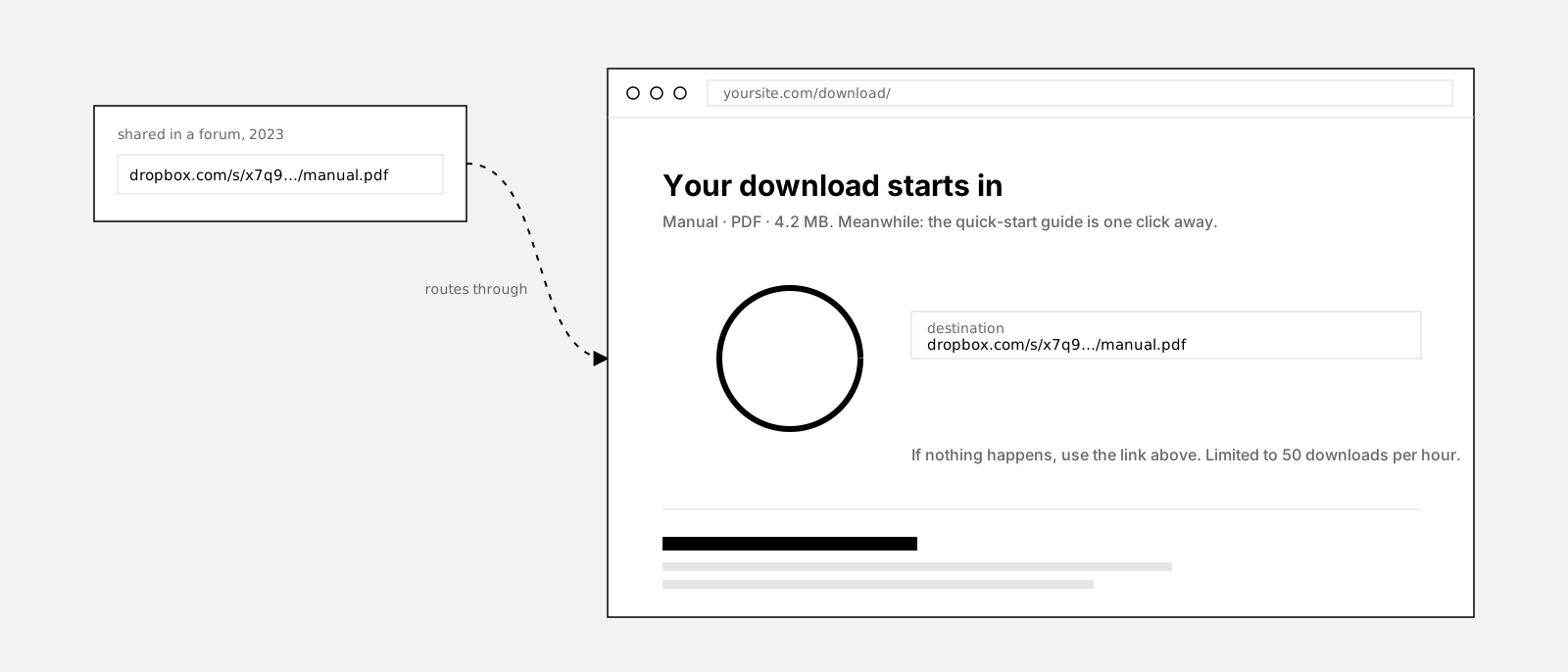
A link to a file on another server or to another website hands the visitor over the moment they click. The file starts from a host with someone else’s name on it, the partner shop opens without a word from you, and the click is the last thing that happens on your site. You do not even learn which files people actually took.
A short page of your own in between changes that. It says what is happening, “Preparing your download” or “You are leaving this website”, shows the file name or the target domain, and has room for whatever you put around it: a thank-you, the next lesson, a newsletter form, related downloads. And because every click passes through it, it can count: views and downloads per file and day, nothing about the person.
The catch with most redirect plugins is the plumbing. Links that expire because they were built with a nonce, pages that break under a cache, visitors left on a blank screen when a script is blocked. This plugin keeps that part boring: signed links that never expire, a fallback button at zero, a timer between one and sixty seconds, and link rules that leave every other link alone.
It does not hide the destination. The file name and the domain stay readable on the page; anything confidential needs real authentication, not a countdown.
This is what it looks like
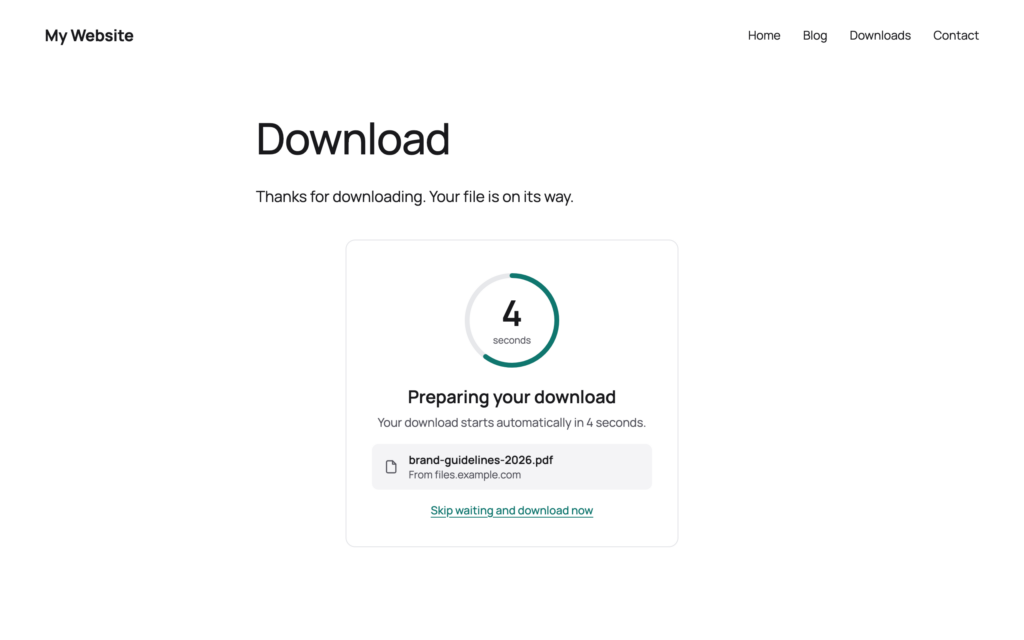
Download
Thanks for downloading. Your file is on its way.
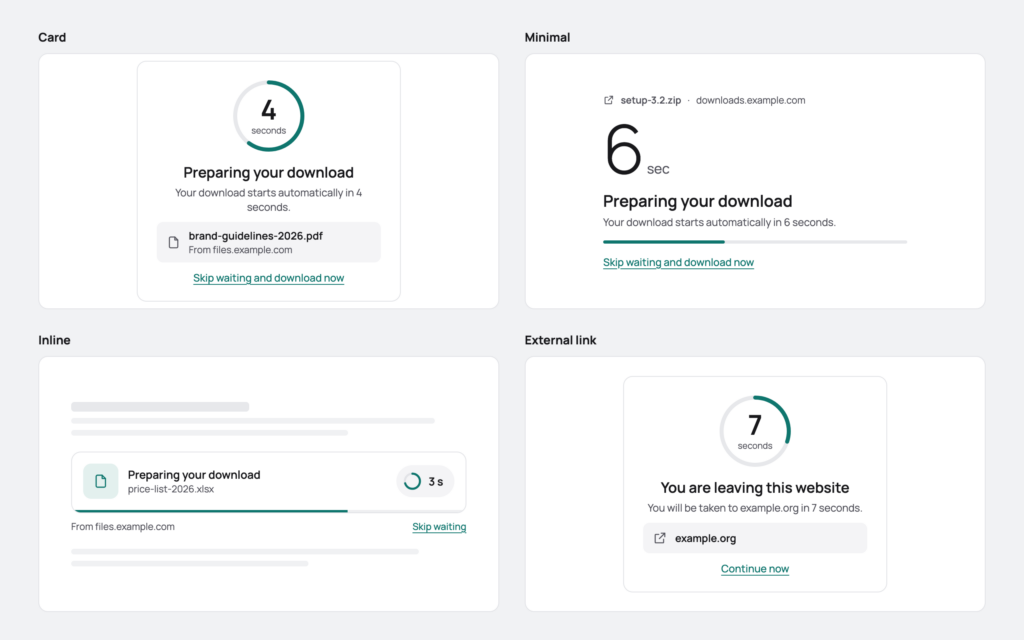
Card, Minimal or Inline, a download or a link to another website, the fallback button at zero, Replay to watch it again. Each of these is a setting in the plugin.
New in 2.0
Version 2.0 is a rebuild from the ground up. Your settings from 1.x are taken over and every link created with 1.x keeps working.
Two kinds of link
Three layouts
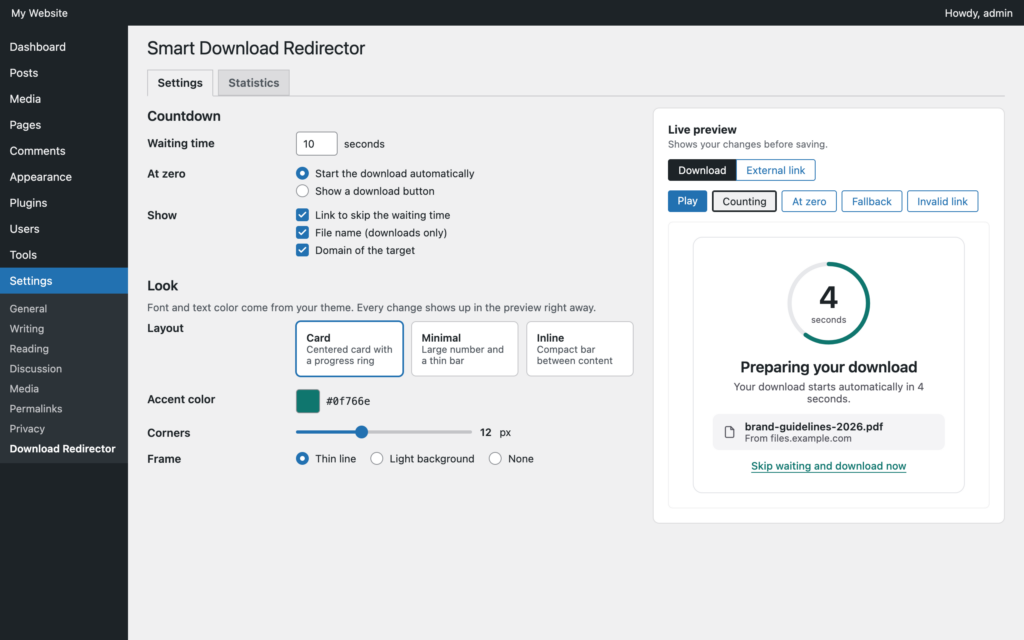
Live preview
Link rules
Statistics
Block and setup
How it works
Choose which links go through it
The visitor lands on your page first
A download or a link to another website
Set it up with the preview open
See what gets used

What it does not do
This is the part most plugin pages leave out.
It does not hide the destination. The file name and the domain are shown on the page and the link can be read by anyone who wants it. A countdown discourages hotlinking and the download limit blunts abuse; anything confidential needs real authentication.
It only changes links WordPress outputs. Posts, pages, blocks, navigation, template parts and widgets are covered. Links in emails, PDFs or on other sites are not, but the link tester gives you the countdown link to use there.
It cannot make the destination fast. The page sits in front of the link; what happens after it is up to the file host, shop or site at the other end.
It counts files, not people. The statistics store totals per target and day. You see which file was taken how often, never who took it or where they came from.
The download limit needs an uncached page. Statistics work behind a page cache, the per-visitor limit does not. Exclude the download page from the cache if you rely on the limit.
It ships in English. The texts on the countdown are yours and translatable with WPML or Polylang; translations of the settings screen come through translate.wordpress.org.
Why not a plain redirect?
A 301 to the destination is invisible, which is the problem: the visitor never sees you, you never learn what was taken, and a bot following the link ten thousand times never meets anything that slows it down.
A link built with a WordPress nonce expires after a day, and a cached page happily serves the expired one. That is where most redirect pages break, usually after the launch, once the cache has warmed up.
A signed link is different: the token is a hash of the destination and a key only your site knows, so it never expires and never depends on who requested the page. The download page can be cached like any other, the statistics are sent from the browser, and the link in a post from three years ago still works.
Updating from 1.x
Update as usual. Your domains, countdown time, heading, link text, counter color, corner radius, download limit and download page are taken over. The layouts map to the new ones: Standard becomes Card, Compact becomes Inline, Progress bar becomes Minimal. Links created with 1.x keep the same format and keep working.
A few things are gone on purpose: the per-element styling (font and text color now come from your theme), the separate redirect delay, the “Show Manual Link” option (the fallback button replaces it) and the Content-Security-Policy header, which blocked fonts and scripts of many themes. Settings and statistics now stay when the plugin is deleted, unless you turn on removal.
Set up in three steps
Install it
Create the download page
Add a rule and test it
Free forever, and why
This plugin is free and stays free, statistics included. There is no Pro tier and none is planned. It exists because a link recommended in a post years ago should still lead through your page today, and the plugins that did this either expired their links or sold the countdown and the counter as a Pro feature.
If it saved you an afternoon, the useful things are a rating on wordpress.org, a post in the support forum when something is off, or a hand with the translation.
Frequently asked questions
Do I have to change my existing links?
Which links are changed?
Can I use it as a notice for external links?
How does it tell downloads and external links apart?
How long can the countdown be?
Can I put my own content on the download page?
Does it work with caching plugins?
What do the statistics store?
What if the redirect does not happen?
Is it multilingual?
What happens to my settings from 1.x?
What happens on uninstall?
Is there a Pro version?
Changelog
Oct 1, 2026: rebuilt from the ground up. Three layouts (Card, Minimal, Inline) with a live preview in the settings; a separate screen and texts for external links; link rules for domains with *.subdomains, file types, media library files and all external links, with exclusions; a link tester and a button that creates the download page; the "Download Countdown" block; download statistics with chart, table and dashboard widget; fallback button, also without JavaScript; timer pauses in background tabs, screen reader announcements, reduced motion; links in navigation, template parts and all blocks recognized; settings from 1.x taken over.
Jun 24, 2026: signed links instead of nonces, so links no longer expire and survive page caching; rate limiting actually enforced; security headers on the countdown request; no more forced www; the timer no longer runs twice; PHP 8.1 compatibility.
Jul 9, 2025: first release: domain-based routing through a countdown page, three layouts, custom heading and link text, per-element styling, rate limiting.
More from desk9
Simple Password Protect One password in front of the whole site, for the week before a site goes public.
Broken Content Reporter Readers report a dead download link with one click, before it costs you the next visitor.
All desk9 plugins Every plugin, free and Pro, on one page.
Free forever. No Pro, no nag screens.
Every feature is in the free version. Updates arrive through WordPress, no account and no license key.
Free WordPress plugin
Download from wordpress.orgEvery feature, no Pro version
Updates through WordPress
No account, no license key
At a glance
Why it is free
Every feature is in the free plugin, and it stays that way. If it saves you time, a review on wordpress.org is the best way to say thanks.