Why Your Sticky CTA Costs 0ms and Your Popup Plugin Costs 400ms
A call-to-action should help conversions, not slow down the page that is supposed to convert. That sounds obvious, but many WordPress CTA and popup plugins load far more than a simple button actually needs: JavaScript bundles, animation libraries, tracking code, event listeners and additional network requests. So I wanted to test a simple question: The…
d9
Published
A call-to-action should help conversions, not slow down the page that is supposed to convert.
That sounds obvious, but many WordPress CTA and popup plugins load far more than a simple button actually needs: JavaScript bundles, animation libraries, tracking code, event listeners and additional network requests.
So I wanted to test a simple question:
The question — how much performance should a simple sticky CTA actually cost?
The setup
The test used a stock WordPress block theme with a simple product page and WebPageTest running on a throttled 4G profile.
Two approaches were compared.
Variant A used a lightweight sticky CTA rendered directly by the server. The button was positioned with CSS and required roughly 2 KB of additional HTML and CSS.
Variant B used a popular popup-style WordPress plugin that loaded its own JavaScript and tracking bundle before the CTA became fully interactive.
The numbers
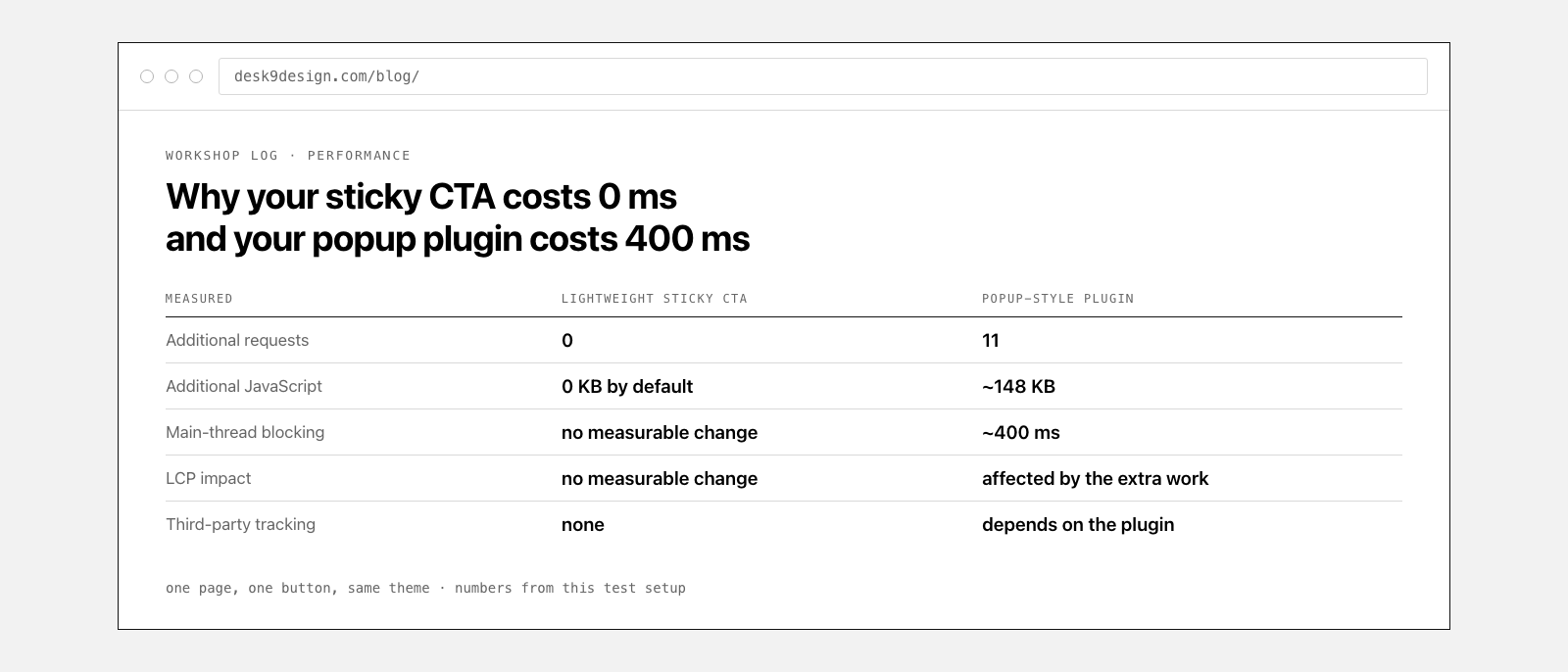
Variant A produced no measurable change in the test. There were no additional requests, no meaningful main-thread work and no measurable difference in Largest Contentful Paint.
Variant B added 11 additional requests, approximately 148 KB of JavaScript and around 400 ms of main-thread blocking before the button was fully interactive.
| Metric | Lightweight sticky CTA | Popup-style plugin |
|---|---|---|
| Additional requests | 0 | 11 |
| Additional JavaScript | 0 KB by default | ~148 KB |
| Main-thread blocking | No measurable change | ~400 ms |
| LCP impact | No measurable change | Potentially affected by additional work |
| Third-party tracking | None | Depends on plugin setup |
These numbers describe this specific test setup. Results will vary depending on the plugin, theme, hosting environment, page complexity and configuration.
Rule of thumb — if a CTA needs JavaScript just to exist, you pay for that JavaScript on every page view. If JavaScript is only needed for optional interactions, the baseline cost can stay extremely small.
Why does the difference get so large?
The visible result may look similar: a button fixed to the screen.
But the way that button reaches the browser can be completely different.
A server-rendered sticky CTA can be little more than ordinary HTML plus a few CSS rules. The browser already knows how to render both. There is very little extra work to do.
A popup system often has a much broader job. It may need to evaluate triggers, display rules, animations, timers, scroll depth, exit intent, analytics, targeting conditions and conversion events.
Those features can be useful. But if all you actually need is a persistent “Call now”, “Get a quote” or “Add to cart” button, loading an entire campaign engine can be unnecessary overhead.
HTML and CSS are already enough for the basic job
A sticky CTA does not need a JavaScript framework to stay fixed at the bottom of a page.
CSS can handle positioning. HTML can provide the link or button. The browser can render both immediately as part of the normal document.
JavaScript only becomes necessary when you add behaviour that genuinely requires it: conditional interactions, advanced triggers, dynamic state changes or optional analytics.
Performance principle — start with what the browser can already do. Add JavaScript only when the feature actually needs it.
Why main-thread work matters
Downloading JavaScript is only part of the cost.
Once the browser receives a script, it may still need to parse, compile and execute it. During that work the main thread can be busy doing something other than responding to the user.
On a fast desktop computer that delay may be difficult to notice. On slower phones, busy pages or throttled connections, the difference becomes much more visible.
That is why a seemingly small interface element can have a surprisingly large performance cost when it ships with a large JavaScript bundle.
Do popup plugins have a place?
Absolutely.
A full popup or conversion platform can make sense when you need exit-intent campaigns, complex targeting rules, lead forms, multi-step funnels, animations, testing and detailed analytics.
The problem is not that those features exist. The problem is loading all of them for a job that only requires a simple sticky action.
The right tool depends on the problem you are actually trying to solve.
What to look for in a lightweight CTA plugin
If performance matters, the underlying architecture is more important than the screenshot on the plugin page.
- Server-rendered markup whenever possible
- CSS-based positioning instead of JavaScript layout logic
- No JavaScript required for the basic CTA
- No unnecessary third-party requests
- No tracking loaded unless you explicitly need it
- Assets loaded only where they are required
- Advanced features kept separate from the basic rendering path
A CTA plugin should not need to behave like a marketing automation platform unless you actually want marketing automation.
This is why I built Sticky CTA Button differently
Desk9 Sticky CTA Button was designed around the basic idea that the core CTA should be as cheap as possible to render.
The basic button is server-rendered and positioned with CSS. JavaScript is not required simply to make the CTA appear on the page.
That keeps the baseline small while still leaving room for more advanced functionality when a site actually needs it.
The Pro version adds more powerful CTA profiles, targeting options and additional actions for websites that need different calls to action depending on the page or use case.
The bigger lesson
This test is not really about one button and one popup plugin.
It is about choosing software that matches the size of the problem.
WordPress makes it very easy to add features, but every feature has a cost. More scripts, more requests and more background logic eventually add up.
If the browser can solve the problem with HTML and CSS, letting it do so is often the fastest option.
The takeaway — do not ask how many features a plugin can load. Ask how little it needs to load to solve your problem.
Sticky CTA Button keeps the baseline lightweight.
Server-rendered, CSS-positioned and no JavaScript required for the basic CTA.
d9
About the author
desk9 is a one-developer WordPress shop. Every article here documents something built, measured or broken first-hand — maintaining a small catalog of plugins and themes across thousands of live sites.